Anker Prime 14-in-1 Docking Station: Worth the Pack Weight for Traveling Creators?
Packing for remote production usually involves a frustrating trade-off between carrying a clutter of individual power bricks and settling for underpowered travel hubs that choke under the strain of high-bitrate media transfers. Traveling video editors, digital nomads, and traveling photographers often find that compact dongles run scalding hot, lack sufficient power delivery for performance laptops…
10 min read


Reviewed
Anker Prime 14-in-1 Docking Station
Buyer rating
Liked
Average of 698 Amazon ratings — not a score from testing of our own.
- 5★71%
- 4★12%
- 3★6%
- 2★3%
- 1★8%
Price today
| Amazon | Not listed | View deal |
|---|
- Sold by AnkerDirect, shipped by Amazon
We track one retailer, so this is not a price comparison. Affiliate link; price and stock come from the listing and change without notice.
What you need to know
- Built to streamline mobile setups, the integrated anker prime dock power delivery system supplies up to 160W of total output across connected equipment. Anker Prime 14-in-1 Docking Station Features Explained
- Running high-throughput anker prime docking station for video editing workflows with multiple fast external NVMe solid-state drives. Best Use Cases
- The dock requires a laptop equipped with a fully functional USB-C, USB4, or Thunderbolt port that natively supports DisplayPort Alternate Mode and USB Power… Before You Buy
- If your workflow demands triple or quad displays in a corporate deployment, enterprise models like the Universal Dock or the hp usb-c dock g5 docking station offer… How It Compares With Similar Picks
- If you frequently relocate between extended rental apartments, remote studio hubs, or client offices, packing this 1.28 kg powerhouse replaces an entire collection… Bottom Line
One line lifted from each section below — follow the link to read that section in full.
As Amazon Associates, we earn from qualifying purchases. This means we may receive a small commission at no extra cost to you if you click through and make a purchase.
Packing for remote production usually involves a frustrating trade-off between carrying a clutter of individual power bricks and settling for underpowered travel hubs that choke under the strain of high-bitrate media transfers. Traveling video editors, digital nomads, and traveling photographers often find that compact dongles run scalding hot, lack sufficient power delivery for performance laptops under render loads, and offer too few ports to ingest footage while charging field monitors, cameras, and drones. The Anker Prime 14-in-1 Docking Station enters this space with an ambitious pitch: bringing comprehensive desktop workstation connectivity and a 160W charging infrastructure into a single unified unit for creators on the move.
At an item weight of 1.28 kg, this device is not a featherweight pocket adapter, but for mobile creatives setting up temporary edit suites in hotel rooms, production trailers, or shared workspaces, it eliminates the need for separate chargers and port splitters. Delivering three USB-C ports capable of pushing up to 100W each alongside ten total USB connections and dual video ports, it acts as a reliable power and data anchor. If you are willing to dedicate the luggage allowance to carry its substantial frame, it establishes an organized, high-bandwidth basecamp wherever your production work takes you.
Quick Verdict
The Anker Prime 14-in-1 Docking Station bridges the gap between fixed desktop power and portable production rigs by bundling an enormous 160W total output pool with 10Gbps data pathways across a generous ten-USB port array. While its 1.28 kg physical bulk and lack of extended dual-monitor support on macOS demand consideration, its ability to simultaneously power hungry editing laptops and fast external storage makes it an exceptionally capable field studio engine.
- Integrated 160W total charging architecture capable of delivering up to 100W across individual USB-C ports
- Ten high-utility USB ports with throughput options reaching up to 10Gbps for fast drive offloading
- Dual HDMI video ports supporting up to 2K at 60Hz on DisplayPort 1.4 Windows machines
- Substantial 1.28 kg plastic chassis that anchors securely to temporary work desks without sliding around
Anker Prime 14-in-1 Docking Station Features Explained
160W Total Power Delivery and Charging Architecture
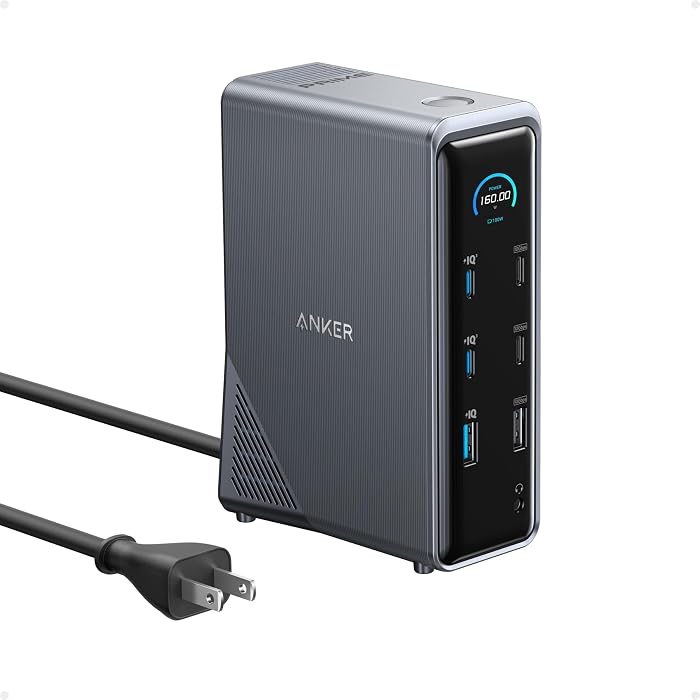
Managing multiple high-draw devices while traveling often requires stuffing half a backpack with proprietary wall plugs, high-wattage bricks, and tangled extension cables. Built to streamline mobile setups, the integrated anker prime dock power delivery system supplies up to 160W of total output across connected equipment. Up to four devices can charge simultaneously, utilizing three versatile USB-C ports that can each output up to 100W maximum, alongside a legacy USB-A port delivering up to 12W max. This charging density allows you to power a workstation laptop at sustained editing wattages while simultaneously juicing up camera batteries, wireless audio receivers, or an iPad running as a secondary reference monitor.
For creators who frequently switch between field locations, consolidating your power footprint into one primary desktop terminal fundamentally simplifies power management. Rather than scouring remote production sites or rental spaces for four open wall receptacles, a single wall outlet powers the entire docking hub. Keep in mind that total simultaneous power is capped at the 160W ceiling, meaning that dynamic power allocation distributes energy logically among the active ports based on connected hardware demand, ensuring host machines remain charged without brownouts during intensive rendering cycles.
High-Speed Data Flow Across Ten USB Ports
Data handling is the lifeblood of mobile content production, and relying on sluggish transfer buses creates severe bottlenecks when dumping multiple terabytes of daily raw footage. With anker prime 14 in 1 data transfer speeds reaching up to 10Gbps, this dock provides the high-bandwidth lanes necessary to saturate portable NVMe solid-state drives and high-speed card readers. In total, the station features ten USB ports designed to coordinate complex peripheral chains, from control surfaces and editing consoles to external audio interfaces and mouse transceivers.
Beyond standard USB data lanes, the station integrates an Ethernet port and an audio jack, providing stable, low-latency wired networking for uploading project archives directly to cloud servers and clean analog monitoring for audio scrubbing. When comparing this comprehensive hub layout against a stripped-down travel dongle like the anker nano usb-c hub, the abundance of 10Gbps data interfaces ensures that multiple external media drives can run concurrently without throttling interface speeds or disconnecting drives mid-transfer.
Dual Display Capabilities and Host Limitations
Multi-screen productivity is a key asset when editing complex timelines, color grading, or managing asset bins on the road. The dock provides dual HDMI ports designed to run multi-display configurations. On Windows systems running DisplayPort 1.4 via USB-C, USB4, or Thunderbolt connections, the unit can output dual displays at up to 2K resolution at 60Hz, while host machines limited to DisplayPort 1.2 step down to dual 1080p outputs at 60Hz. It is important to note that the hardware does not support ultra-wide 5120×1440 resolution monitors, so editors using niche panoramic panels will need direct video cabling instead.
Operating system handling varies dramatically between platforms, which is a vital consideration for mobile creators. While Windows 10 and 11 offer full extended multi-monitor functionality, users must understand the limitations of anker 14-in-1 dock dual display macos compatibility. Under macOS, both external HDMI monitors will display an identical, mirrored screen rather than two separate extended desktops due to Apple operating system display transport architecture. Mac users who need independent external displays might explore dedicated alternatives like the anker prime dl7400 docking station (14-in-1, triple display, displaylink) to circumvent native multi-stream limitations.
Form Factor, Physical Design, and Travel Viability
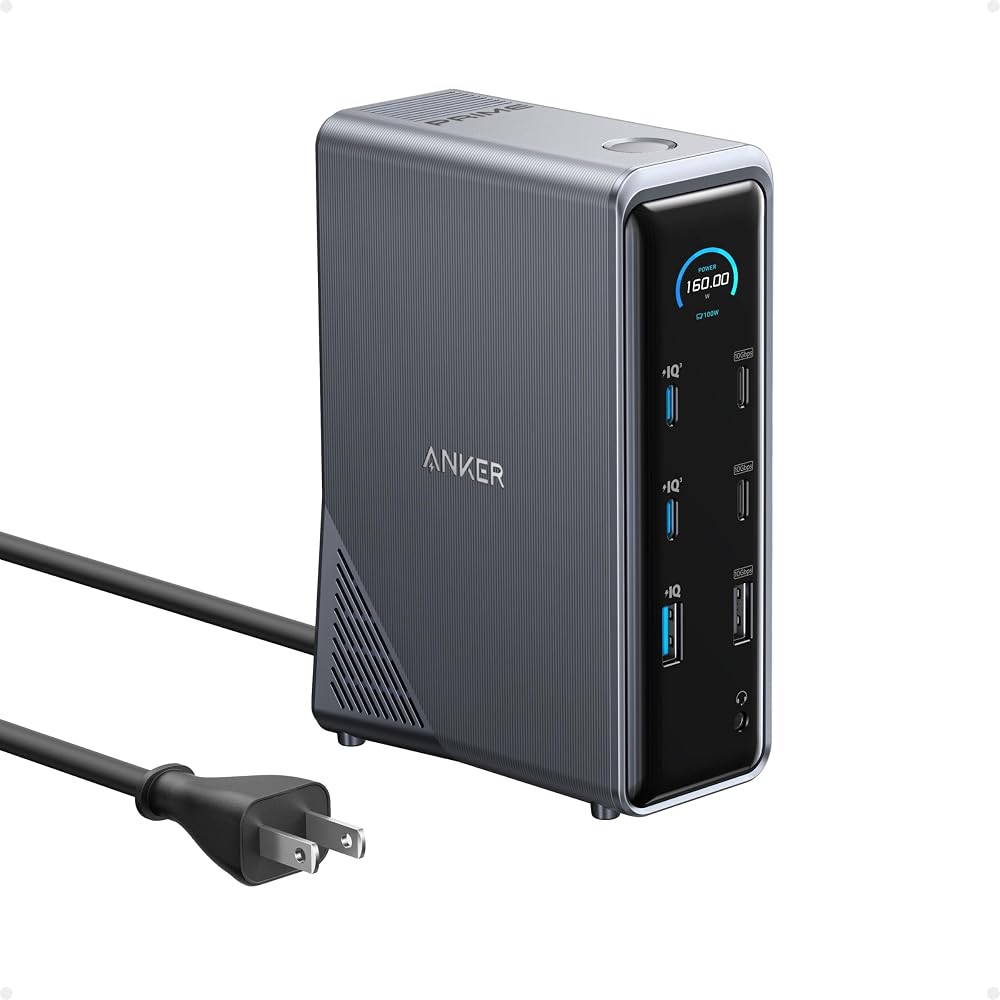
The physical presence of the dock reflects its role as a sturdy, high-output production anchor rather than a disposable pocket adapter. Built with a durable grey plastic enclosure, it sports an upright footprint featuring an integrated smart interface on the exterior. At an anker prime docking station weight of exactly 1.28 kg, placing this unit in a backpack adds nearly three pounds to your payload—equivalent to carrying an extra slim laptop. However, that physical mass serves an intentional operational purpose on temporary desks.
Lightweight travel dongles often get twisted and dragged off tables by stiff HDMI and USB cables, putting strain on delicate laptop ports. In contrast, the substantial heft of this dock keeps it planted firmly on hotel desks, folding production tables, or studio workstations even when all fourteen ports are occupied. Anker packages the station with a heavy-duty 3.3-foot (1-meter) USB-C upstream cable rated for 100W charging and 10Gbps data speeds, ensuring your computer connects with full throughput right out of the box.
Specs
| Hardware Interface | USB Type-C (Supports USB-C, USB4, and Thunderbolt) |
|---|---|
| Total Number of Ports | 14 |
| Total USB Ports | 10 |
| Maximum Power Output | 160W Total (Up to 100W Max per USB-C, 12W Max on USB-A) |
| Data Transfer Speeds | Up to 10Gbps |
| Display Outputs | Dual HDMI (Up to 2K@60Hz on DP 1.4; Up to 1080p@60Hz on DP 1.2) |
| Audio and Networking | 3.5mm Audio Port, Integrated Ethernet Port |
| Supported Operating Systems | Windows 10/11, macOS 14 Sonoma or later, ChromeOS 137 or later |
| Incompatible Operating Systems | Linux |
| Chassis Material and Color | Grey Plastic Enclosure with Smart Interface |
| Item Weight | 1.28 kg |
| Included In The Box | Dock, 3.3 ft (100W, 10Gbps) USB-C Upstream Cable, Safety Sheet |
Full spec sheet from the listing (25 entries)
| 0 | Hardware Interface, USB Type C |
|---|---|
| 1 | Additional Features, 14-in-1 Connectivity, docking station |
| 2 | Compatible Devices, Full Functional USB C Lenovo/HP/Dell laptops,Macbook/iMac(For macOS, the displays on the both external monitors are identical) See more |
| 3 | Total Usb Ports, 10 |
| 4 | Data Transfer Rate, 10 gigabits_per_second |
| 5 | Number of Ports, 14 |
| 6 | Minimum Required Operating System Version, ChromeOS 137, Mac OS 14 Sonoma, Windows 11 |
| 7 | Operating System, Chrome OS, Windows 10 |
| 8 | Color, Grey |
| 9 | Enclosure Material, Plastic |
| 10 | Item Weight, 1.28 kg |
| 11 | Brand, Anker |
| 12 | Item Highlight, Dual 4K HDMI, 160W Max Output, 10Gbps Data Transfer, Smart Interface, Audio and Ethernet Ports for Dell, HP, Lenovo and More |
| 13 | Manufacturer, Anker |
| 14 | UPC, 194644067397 |
| 15 | Number of Items, 1 |
| 16 | Unit Count, 1 Count |
| 17 | Built-In Media, Anker Prime Charging Docking Station, USB-C cable, safety sheet |
| 18 | Model Number, A83B6 |
| 19 | Mfr Part Number, A83B6 |
| 20 | Warranty Description, 24 months |
| 21 | Best Sellers Rank, #359 in Computers & Accessories (See Top 100 in Computers & Accessories) #43 in Laptop Docking Stations |
| 22 | ASIN, B0CW9249DK |
| 23 | Customer Reviews, 4.3 4.3 out of 5 stars (698) 4.3 out of 5 stars |
| 24 | Special Feature, 14-in-1 Connectivity, docking station |
Quoted from the product listing, not measured by us.
Anker Prime 14-in-1 Docking Station Pros and Cons
Pros
- Robust 160W total simultaneous charging output
- Fast 10Gbps data transfer speeds
- Ten USB ports for heavy peripheral setups
- Included 3.3-foot 100W 10Gbps host cable
- Integrated Ethernet and audio connection options
Cons
- Heavy 1.28 kg weight for mobile packing
- Mirror-only external display support on macOS
- Incompatible with Linux operating systems
- No integrated SD or microSD card slots
Check Anker Prime 14-in-1 Docking Station on Amazon
Best Use Cases
- Consolidating messy equipment setups into an anker prime 160w dock travel setup for long-term remote workstation stays.
- Running high-throughput anker prime docking station for video editing workflows with multiple fast external NVMe solid-state drives.
- Building a shared multi-device charging and connection station for small media field crews in mobile production vans.
- Providing reliable wired Ethernet, audio monitoring, and peripheral routing for Windows laptops at remote production desks.
Before You Buy
Before packing this heavy workstation hub for your next production trip, verify your host machine specifications and operating system requirements against the anker prime docking station specs. The dock requires a laptop equipped with a fully functional USB-C, USB4, or Thunderbolt port that natively supports DisplayPort Alternate Mode and USB Power Delivery. The minimum operating system versions specified by the manufacturer are Mac OS 14 Sonoma, Windows 11 (with backwards compatibility for Windows 10), and ChromeOS 137. Linux is explicitly not compatible with this dock, meaning creators operating on mobile Linux distributions must pass on this model.

Additionally, examine what is missing from the physical interface before retiring your existing peripheral kit. Despite its 14-in-1 connectivity, the listing does not specify any integrated SD or microSD card slots, meaning travel photographers and videographers will still need dedicated USB-C or USB-A memory card readers to ingest footage from cameras. It also does not support ultra-wide 5120×1440 displays. The package includes the dock, documentation, and a single 3.3-foot 100W 10Gbps USB-C upstream cable, but additional HDMI cords and peripheral cables must be supplied separately.
How It Compares With Similar Picks
| Product | Best For | Key Difference |
|---|---|---|
| Anker Prime 14-in-1 Docking Station | High-wattage multi-device power and fast data offloading | 160W total output, 14 ports, 10Gbps speeds, 1.28 kg desktop form factor |
| Dual HDMI USB C Dock | Ultra-lightweight travel packing with direct media card ingest | 8-in-1 port layout, integrated SD/TF card reader, 85W pass-through charging, charger not included |
| Universal Dock | Multi-monitor corporate and professional office desks | Quad display support, 100W power delivery, DisplayPort and HDMI outputs |
| for Windows and Mac | Broad legacy laptop and multi-OS peripheral compatibility | Driver-required DisplayLink architecture, USB 3.0 or USB-C connection, dual HDMI output |
Deciding between these options hinges entirely on balancing packing bulk against port capabilities and independent screen requirements. If you are packing strictly for an airplane carry-on where every ounce matters and you require built-in camera card slots, the compact 8-in-1 Dual HDMI USB C Dock is far easier to slip into a pocket, though it lacks high-wattage onboard power and requires carrying an external laptop charger. If your workflow demands triple or quad displays in a corporate deployment, enterprise models like the Universal Dock or the hp usb-c dock g5 docking station offer extensive multi-monitor routing through DisplayPort connections. Meanwhile, users operating mixed legacy fleets who require dual extended monitors on older machines may lean toward driver-based options like for Windows and Mac, whereas the Anker Prime excels when maximum charging power and 10Gbps throughput are your top mobile priorities.

Bottom Line
Deciding whether the anker prime charging docking station 14-in-1 dual display 160w model makes sense for your travel kit comes down to your tolerance for carrying dedicated desktop hardware. If you frequently relocate between extended rental apartments, remote studio hubs, or client offices, packing this 1.28 kg powerhouse replaces an entire collection of loose wall chargers, port hubs, and audio converters. Its 160W combined power capacity and rapid 10Gbps USB lanes ensure your production laptop stays juiced while offloading high-bitrate media files effortlessly.
However, travelers operating out of minimalist daypacks or those who rely on lightweight carry-on baggage might find the sheer physical mass burdensome for short, single-day hops. Furthermore, Mac users who insist on independent dual external monitors will find the mirrored HDMI output restrictive. For Windows creators seeking an all-in-one charging station and data backbone that anchors a mobile editing desk, the versatility of the anker prime dock makes it a formidable, high-performing field asset.
FAQ
Is anker prime 14-in-1 dock worth it for traveling video editors?
It is well worth the weight if you run a mobile production desk with multiple external SSDs, a high-draw laptop, and camera accessories that need simultaneous power. It replaces multiple wall adapters with a single 160W power source, although light packers may find its 1.28 kg weight heavy for short trips.
Does the Anker Prime 14-in-1 Docking Station support dual extended monitors on macOS?
No, the listing explicitly notes that for macOS, the displays on both external monitors are identical. Mac users can mirror their display across two screens, but macOS will not extend two separate independent external desktop workspaces through this dock.
What is the maximum charging output available on a single port?
The dock delivers up to 100W maximum from any of its three USB-C ports, drawing from a combined 160W total power pool. This provides ample charging speed for standard modern editing laptops and high-capacity portable devices.
Does this docking station work with Linux operating systems?
No, the manufacturer specifically states that this device is not compatible with Linux. It is officially supported on Windows 10 and 11, Mac OS 14 Sonoma or later, and ChromeOS 137 or later.
Can I connect an ultra-wide 5120×1440 display to this dock?
No, the manufacturer notes that this product does not support 5120×1440 resolution monitors. It is designed to handle displays up to 2K at 60Hz when using a DP 1.4 host laptop or 1080p at 60Hz with a DP 1.2 host laptop.
How this site works
- 194reviews published
- 2,323products with a buyer rating
- 2,260products with listed features
- 84brands covered
Ratings, prices, stock and specifications are read from the Amazon product listing. We do not run lab tests of our own, so a score here is the average rating left by buyers, not a verdict from a test bench. We track one retailer, so prices here are not a comparison.



