BenQ PD3225U Review: Is This 32-Inch 4K Display the Ultimate Desk Base for Mobile Editors?
Traveling content creators, video editors, and photographers frequently endure the visual constraints of small laptop screens while working out of airport lounges, cafes, and client offices. While a compact display keeps your backpack manageable on the road, serious color-critical work and expansive timeline editing demand significant screen real estate, reliable pixel density, and precise color…
9 min read




Reviewed
BenQ PD3225U
Buyer rating
Very well liked
Average of 83 Amazon ratings — not a score from testing of our own.
- 5★84%
- 4★9%
- 3★3%
- 2★0%
- 1★4%
Price today
| Amazon | Not listed | View deal |
|---|
- Sold by BenQ INFTY Lab, shipped by Amazon
We track one retailer, so this is not a price comparison. Affiliate link; price and stock come from the listing and change without notice.
What you need to know
- The BenQ PD3225U incorporates IPS Black technology to push that static contrast ratio up to 2000:1, significantly deepening black levels across its 32-inch 4K UHD… BenQ PD3225U Features Explained
- Facilitating seamless dual-system operation via the integrated KVM switch for creators balancing a portable laptop and a dedicated rendering desktop. Best Use Cases
- The BenQ PD3225U is an unapologetically massive display, measuring 32.28 inches wide, 26.6 inches high, and weighing 13.4 kg with its anodized base. Before You Buy
- If your creative work takes a backseat to fast-paced competitive gaming or you need an ultra-compact secondary screen on a strict budget, the Sceptre New 22-Inch… How It Compares With Similar Picks
- The BenQ PD3225U excels in this role by pairing an expansive 32-inch 4K canvas with a 2000:1 contrast ratio, factory-calibrated color profiles, and seamless Mac… Bottom Line
One line lifted from each section below — follow the link to read that section in full.
As Amazon Associates, we earn from qualifying purchases. This means we may receive a small commission at no extra cost to you if you click through and make a purchase.
Traveling content creators, video editors, and photographers frequently endure the visual constraints of small laptop screens while working out of airport lounges, cafes, and client offices. While a compact display keeps your backpack manageable on the road, serious color-critical work and expansive timeline editing demand significant screen real estate, reliable pixel density, and precise color calibration the moment you get back to your studio desk. The BenQ PD3225U steps into this equation as a heavy-duty, stationary workstation monitor engineered specifically to anchor mobile Mac workflows.
By pairing an expansive 32-inch 4K UHD panel with advanced IPS Black panel technology and an integrated 40Gb/s Thunderbolt 3 dock, this display transforms a portable editing laptop into a comprehensive production suite through a single cable connection. For mobile creators wondering whether dedicating desk space to a substantial external screen is worth the investment, this display proves itself as a precision powerhouse that streamlines the transition between traveling light and editing without compromise.
Quick Verdict
The BenQ PD3225U delivers exceptional color fidelity, double the contrast ratio of traditional IPS screens, and a reliable single-cable docking architecture, making it an ideal stationary hub for mobile creators returning to their desks.
- High-precision 2000:1 contrast ratio via IPS Black technology for detailed shadow rendition.
- Integrated 40Gb/s Thunderbolt 3 dock delivering simultaneous 85W laptop power delivery and peripheral data routing.
- Specialized M-Book mode with Calman and Pantone validations for exact Apple color consistency.
- Physical Hotkey Puck and Display Pilot 2 integration for instant screen management and input switching.
BenQ PD3225U Features Explained
IPS Black Panel Technology and Contrast Performance
Standard IPS panels have long been the workhorses of visual design, but their typical 1000:1 contrast ratio often leaves deep shadows looking milky or washed out under studio lighting. The BenQ PD3225U incorporates IPS Black technology to push that static contrast ratio up to 2000:1, significantly deepening black levels across its 32-inch 4K UHD panel. This enhancement gives nomadic filmmakers and colorists the shadow depth necessary to grade dark, moody footage accurately without suffering from common edge light pollution or graying blacks.
Beyond contrast depth, the display maintains an anti-glare screen finish and wide 178-degree viewing angles to prevent ambient window glare from skewing your perception. Picture enhancement technologies like BenQ Uniformity calibration balance luminance and chrominance across the entire display area, while HDR10 support helps preview high-dynamic-range deliverables. When evaluating workstation upgrades alongside mainstream options like the dell 27 monitor s2725qs, the deeper black levels and specialized panel uniformity of this IPS Black monitor stand out immediately for visual grading.
Thunderbolt 3 Docking and Daisy Chain Connectivity
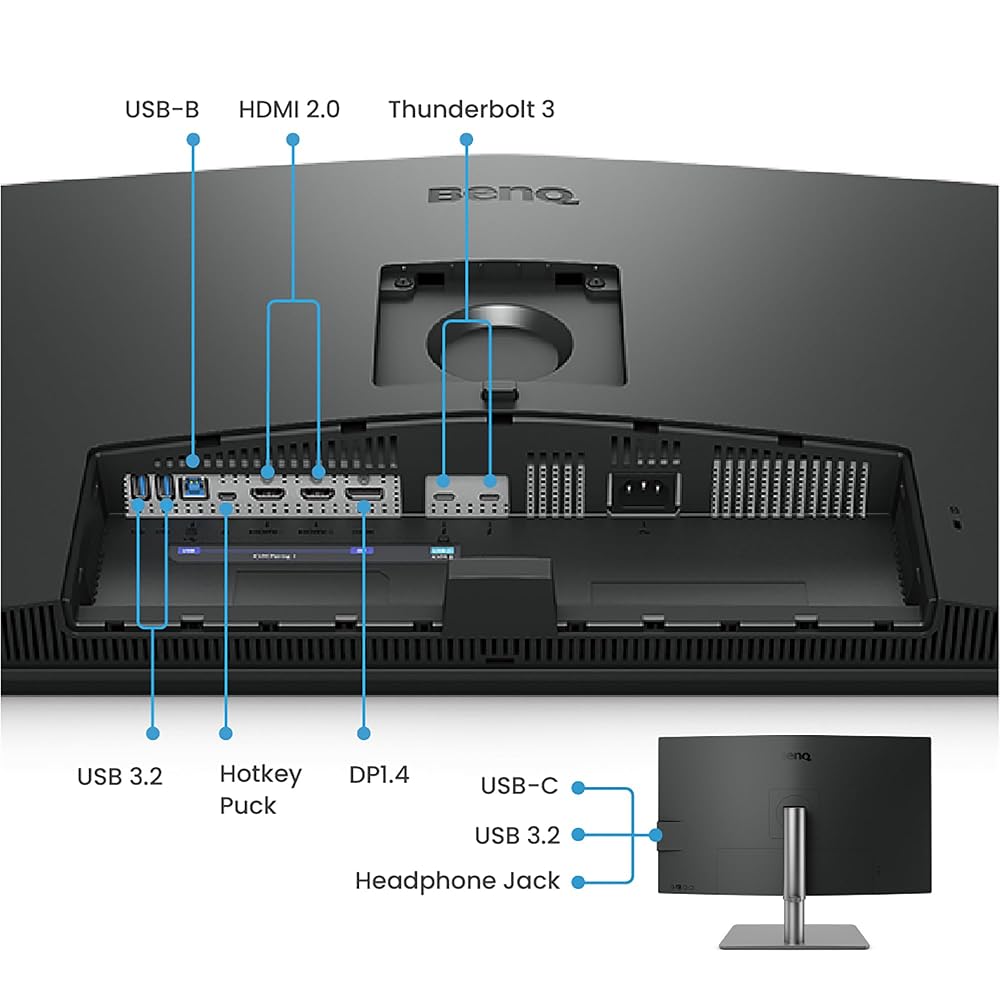
Returning from a travel assignment typically involves plugging in power bricks, external storage drives, audio gear, and video cables, creating a tangled desk environment. The BenQ PD3225U solves this friction through its 40Gb/s Thunderbolt 3 architecture, which routes video, audio, high-speed data, and 85W of charging power through a single USB-C cable directly to your laptop. This allows traveling creators to leave their charging bricks packed in their travel bags while utilizing the monitor as their central studio dock.
The display also supports daisy-chain connectivity, enabling creators to connect an additional monitor directly downstream through Thunderbolt without occupying a second port on their laptop. An integrated USB hub and KVM switch allow users to toggle a single keyboard and mouse between two separate computer systems, facilitating seamless switching between a travel laptop and a dedicated rendering workstation. Rather than turning to an oversized presentation screen like an amazon ember 43 inch tv, this dedicated Thunderbolt dock display keeps high-speed workflows centralized and neat.
Color Accuracy and Mac Workflow Integration
Color grading on a mobile setup can lead to jarring surprises if your stationary monitor renders hues differently than your laptop screen. The BenQ PD3225U addresses this issue directly with its AQCOLOR technology, achieving 98% Display P3 color space coverage, 100% sRGB, and 100% Rec.709 coverage. Backed by factory calibration out of the box, the display guarantees a Delta E of two or less, ensuring that images and video files remain true to standard broadcast and digital delivery specifications.
Mac users will especially appreciate the inclusion of M-Book mode, which matches the monitor color temperature, gamma curve, and saturation profile to Apple visual standards. Verified by Calman and validated by Pantone, this mode ensures that color assets look uniform across both the laptop Retina display and the 32-inch monitor surface. This seamless matching eliminates guesswork during intensive photo editing and video post-production sessions.
Display Pilot 2, Hotkey Puck, and Ergonomic Design
Navigating buried on-screen display menus to change input sources or tweak brightness can disrupt an editing session. BenQ includes the Hotkey Puck, a physical desktop controller equipped with a rotary dial and customizable buttons that let you switch color profiles, toggle inputs, and adjust screen brightness instantly. Through Display Pilot 2 software, macOS users can also synchronize screen brightness directly from their Mac keyboard, activate auto-pivot functions, and configure desktop partitioning layouts.
Physical positioning is supported by an anodized metal base and stand that offer comprehensive ergonomic adjustment, including height adjustment, tilt, swivel, and full 90-degree pivot. While gaming monitors like the acer nitro kg271u focus primarily on high frame rates with basic tilt stands, this sturdy professional stand allows mobile editors to position their screen at the exact ergonomic height needed to avoid posture fatigue during long editing days.
Workspace Integration for Traveling Creators
Mobile professionals spend weeks working with lightweight gear, carefully managing backpack weight and battery reserves. While all-in-one lifestyle panels like the 32 inch smart monitor m8 m80f cater to entertainment streaming and light computing, the PD3225U provides the robust structural stability and high-end color grading pipeline needed for commercial video workflows. Its substantial 13.4 kg footprint guarantees that the screen remains completely stable on the desk without wobbling when adjusting cables or typing vigorously.
Because the monitor provides 85W of power delivery alongside a 5-millisecond response time and a standard 60-hertz refresh rate, it functions as a complete docking station that remains permanently set up at home. Traveling creators can simply set their laptop down, connect one Thunderbolt cable, and instantly access their multi-terabyte scratch drives, mechanical keyboards, and expansive 4K desktop canvas.
Specs
| Screen Size | 32 inches |
|---|---|
| Native Resolution | 4K UHD 3840 x 2160 pixels |
| Panel Technology | LCD with IPS Black Technology |
| Contrast Ratio | 2000:1 |
| Peak Brightness | 250 nits |
| Color Gamut Coverage | 98% Display P3, 100% sRGB, 100% Rec.709 |
| Color Accuracy | Delta E ≤ 2, Factory Calibrated, Pantone Validated, Calman Verified |
| Connectivity | Thunderbolt 3 (40Gb/s, 85W Power Delivery), USB Hub, Daisy Chain, KVM |
| Refresh Rate and Response Time | 60 Hz, 5 ms |
| Ergonomic Adjustments | Height, Tilt, Swivel, Pivot |
| Weight and Dimensions | 13.4 kg; 7.36"D x 32.28"W x 26.6"H |
Full spec sheet from the listing (40 entries)
| 0 | Aspect Ratio, 16:9 |
|---|---|
| 1 | Screen Finish, Anti-glare |
| 2 | Contrast Ratio, 2000:1 |
| 3 | Refresh Rate, 60 hertz |
| 4 | Display Type, LCD |
| 5 | Display Technology, LCD |
| 6 | Viewing Angle, 178 degrees |
| 7 | Brightness, 250 nits |
| 8 | Pixel Pitch, 0.18 |
| 9 | Color Gamut, 99 |
| 10 | Picture Quality Enhancement Technology, BenQ Uniformity, HDR10 |
| 11 | Screen Size, 32 inches |
| 12 | Item Dimensions D x W x H, 7.36"D x 32.28"W x 26.6"H |
| 13 | Item Weight, 13.4 kg |
| 14 | Resolution, 4K UHD 2160p |
| 15 | Display Resolution Maximum, 3840 x 2160 pixels |
| 16 | Native Resolution, 3840×2160 |
| 17 | Response Time, 5 milliseconds |
| 18 | Processor Count, 1 |
| 19 | Total Number of HDMI Ports, 1 |
| 20 | Total Usb Ports, 2 |
| 21 | Number of Component Outputs, 2 |
| 22 | Total USB 3.0 Ports, 6 |
| 23 | Additional Features, Built-In Speakers, Flicker-Free |
| 24 | Specific Uses For Product, Graphic Design, Photo Video Editing |
| 25 | Color, Black |
| 26 | Mounting Type, Wall Mount |
| 27 | Warranty Type, 3 Years Manufacturer Warranty |
| 28 | Shape, Flat |
| 29 | Brand, BenQ |
| 30 | Model Number, PD3225U |
| 31 | Model Name, PD3220U |
| 32 | Warranty Description, 3 Year Manufacturer |
| 33 | UPC, 840046049904 |
| 34 | Manufacturer, BenQ |
| 35 | Unit Count, 1 Count |
| 36 | Best Sellers Rank, #8,094 in Electronics (See Top 100 in Electronics) |
| 37 | ASIN, B0CT441B25 |
| 38 | Customer Reviews, 4.7 4.7 out of 5 stars (83) 4.7 out of 5 stars |
| 39 | Voltage, 240 volts |
Quoted from the product listing, not measured by us.
BenQ PD3225U Pros and Cons
Pros
- Deep 2000:1 contrast ratio via IPS Black technology
- Single-cable 85W Thunderbolt 3 docking and daisy chaining
- Factory-calibrated 98% P3 coverage with M-Book mode
- Convenient Hotkey Puck and Display Pilot 2 controls
- Sturdy ergonomic stand with full height, tilt, swivel, pivot
Cons
- Heavy 13.4 kg build requires permanent desk placement
- Standard 60Hz refresh rate not built for fast gaming
- Moderate 250 nits brightness best suited for controlled lighting
Best Use Cases
- Serving as a single-cable docking station and color grading display for traveling videographers returning to edit 4K footage on a MacBook Pro.
- Providing commercial photographers with factory-calibrated color accuracy and high contrast for fine-art print and digital photo editing.
- Anchoring a dual-screen studio workstation using Thunderbolt daisy-chain connectivity to streamline external storage and peripheral routing.
- Facilitating seamless dual-system operation via the integrated KVM switch for creators balancing a portable laptop and a dedicated rendering desktop.
Before You Buy
Before bringing this monitor into your setup, verify your desk space and power requirements. The BenQ PD3225U is an unapologetically massive display, measuring 32.28 inches wide, 26.6 inches high, and weighing 13.4 kg with its anodized base. While the single Thunderbolt 3 port delivers 85W of power—ample for 13-inch and 14-inch laptops during full-speed work—larger 16-inch laptops under maximum continuous rendering loads may draw more power than the 85W supply provides, requiring you to monitor battery levels during all-night render marathons.
Compatibility relies heavily on having a host computer equipped with a Thunderbolt or fully featured USB-C port capable of handling 40Gb/s bandwidth, DisplayPort alternate mode, and power delivery. While the listing highlights the integrated KVM switch, Hotkey Puck, Display Pilot 2 software, and anti-glare screen finish, the listing does not specify the exact lengths or types of video cables included in the packaging, nor does it specify the precise count of auxiliary HDMI or DisplayPort connections beyond its core Thunderbolt and USB hub architecture.
How It Compares With Similar Picks
| Product | Best For | Key Difference |
|---|---|---|
| BenQ PD3225U | Professional Mac Editing & Color Precision | 32-inch 4K IPS Black with 2000:1 contrast, 98% P3, and 85W Thunderbolt 3 docking |
| Sceptre New 22-Inch Gaming Monitor | Budget High-Refresh Gaming | 22-inch 1080p panel with up to 144Hz refresh rate, DisplayPort, and built-in speakers |
| 1ms | General Office Work & High-Refresh Display | 27-inch 1080p IPS panel with 120Hz refresh, 1ms response, and legacy VGA support |
| Dell 24 Monitor | Compact Desktop Workstations & Everyday Use | 23.8-inch 1080p IPS panel with 144Hz refresh, AMD FreeSync, and dual HDMI ports |
If your creative work takes a backseat to fast-paced competitive gaming or you need an ultra-compact secondary screen on a strict budget, the Sceptre New 22-Inch Gaming Monitor offers a 1080p panel that reaches up to 144Hz in a much smaller profile. For general workspace productivity, spreadsheet management, or casual use, the 1ms Acer monitor provides a 27-inch 1080p 120Hz IPS display with wide input compatibility including VGA, while the Dell 24 Monitor gives office workers a dependable 23.8-inch 144Hz IPS display featuring AMD FreeSync and dual HDMI connectivity for everyday tasks.

Bottom Line
For mobile creators who spend weeks traveling with compact laptops, having a dedicated studio anchor makes all the difference when returning home to finish high-stakes client projects. The BenQ PD3225U excels in this role by pairing an expansive 32-inch 4K canvas with a 2000:1 contrast ratio, factory-calibrated color profiles, and seamless Mac color matching through M-Book mode. It eliminates the visual compromise of standard office panels and cuts desk clutter down to a single Thunderbolt cable.
While its heavy 13.4 kg footprint ensures it stays strictly planted on your workstation and its 60Hz refresh rate is tailored for precision grading rather than high-frame-rate gaming, it delivers outstanding value for visual professionals. If you need a reliable, color-accurate home base that charges your laptop while organizing your external peripherals, the BenQ PD3225U is an exceptional investment for your editing studio.
FAQ
How does the IPS Black panel on the BenQ PD3225U improve video editing?
The IPS Black panel doubles the contrast ratio of traditional IPS monitors to 2000:1, allowing dark shadows and blacks to render with greater depth rather than appearing washed out or gray, which is essential for accurate color grading.
Can the BenQ PD3225U charge my laptop with a single cable?
Yes, the integrated Thunderbolt 3 port provides up to 85W of power delivery to your laptop while simultaneously transferring 4K video signals and high-speed data over a single 40Gb/s cable.
What is the purpose of M-Book mode on this display?
M-Book mode aligns the monitor color rendering, gamma, and white balance with Apple MacBook screens, ensuring that your video and photo edits look consistent across both your laptop and external display.
What is required to set up a daisy chain configuration with this monitor?
To use daisy chaining, connect your host laptop to the monitor primary Thunderbolt 3 input, and then run a compatible Thunderbolt cable from the monitor output port directly to a secondary display.
Does the BenQ PD3225U stand support vertical orientation?
Yes, the included anodized stand features full ergonomic adjustments, including height adjustment, tilt, swivel, and 90-degree pivot for vertical document or code viewing.
How this site works
- 194reviews published
- 2,323products with a buyer rating
- 2,260products with listed features
- 84brands covered
Ratings, prices, stock and specifications are read from the Amazon product listing. We do not run lab tests of our own, so a score here is the average rating left by buyers, not a verdict from a test bench. We track one retailer, so prices here are not a comparison.



