Dell Pro 34 Plus P3425WE Review: Single-Cable Dock for Itinerant Creators
Mobile video editors, photographers, and traveling creators spend weeks operating from cramped laptop screens in hotel rooms, airport lounges, and client offices. Returning to a home base or temporary studio demands an entirely different workstation setup where visual screen space, peripheral connections, and continuous battery charging take priority. Juggling separate power bricks, display adapters, and…
9 min read
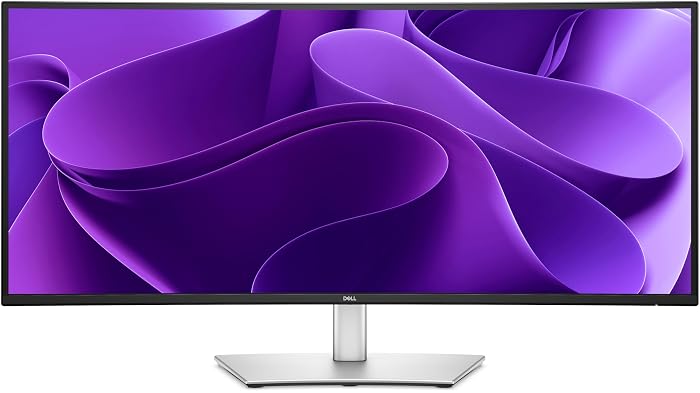


Reviewed
Dell Pro 34 P3425WE
Buyer rating
Very well liked
Average of 41 Amazon ratings — not a score from testing of our own.
- 5★86%
- 4★10%
- 3★0%
- 2★0%
- 1★4%
Price today
| Amazon | Not listed | View deal |
|---|
- Sold by Aventis Systems
We track one retailer, so this is not a price comparison. Affiliate link; price and stock come from the listing and change without notice.
What you need to know
- Charging capacity remains a primary concern for creator laptops, and the Dell P3425WE 90W power delivery output supplies sufficient wattage to run and charge most… Dell Pro 34 P3425WE Features Explained
- Digital media creators balancing simultaneous video playback, project folders, and script documents side by side in standard sRGB color space. Best Use Cases
- The built-in USB-C port provides 90W Power Delivery and relies on DisplayPort 1.4 alternate mode to deliver the native 3440 x 1440 resolution at 100Hz. Before You Buy
- Meanwhile, creators who prefer a traditional dual-screen office arrangement might consider standard flat options like the dell p2422h monitor, or budget gaming… How It Compares With Similar Picks
- Although its 14 kg weight, Class F energy rating, and 37-inch width mean it is strictly a desk anchor rather than a portable companion, it excels in its intended… Bottom Line
One line lifted from each section below — follow the link to read that section in full.
As Amazon Associates, we earn from qualifying purchases. This means we may receive a small commission at no extra cost to you if you click through and make a purchase.
Mobile video editors, photographers, and traveling creators spend weeks operating from cramped laptop screens in hotel rooms, airport lounges, and client offices. Returning to a home base or temporary studio demands an entirely different workstation setup where visual screen space, peripheral connections, and continuous battery charging take priority. Juggling separate power bricks, display adapters, and peripheral cords adds friction to rapid post-production workflows. The Dell Pro 34 P3425WE is engineered to eliminate this desktop clutter by combining an expansive curved canvas with an integrated docking hub, giving itinerant creators a streamlined single-cable docking station between field assignments.
Evaluating this monitor through an on-the-go lens highlights a practical divide between portable field agility and stationary studio performance. Its 14 kg weight and wide desktop footprint ensure it stays firmly anchored to your desk rather than riding in a backpack, but its 90W USB-C power delivery and fluid 100Hz refresh rate make reconnecting effortless. For traveling media professionals seeking an organized, high-efficiency desk hub, it provides a capable, single-cable foundation for intensive editing tasks.
Quick Verdict
The Dell Pro 34 P3425WE functions as a dependable stationary anchor for mobile creators who need an immediate single-cable connection, expansive timeline viewing, and smooth visual response upon returning from field shoots.
- Single-cable USB-C connection delivers DisplayPort 1.4 video and 90W Power Delivery to recharge laptops without external power bricks.
- Curved 34.1-inch IPS panel with 3440 x 1440 resolution and a 21:9 aspect ratio provides generous horizontal space for multi-track video editing.
- A 100Hz refresh rate with adaptive sync ensures fluid desktop navigation and smooth timeline scrubbing compared to traditional 60Hz panels.
- Solid visual fidelity supported by an enhanced 1500:1 contrast ratio, 350 cd/m² brightness, and 99% color gamut coverage.
Dell Pro 34 P3425WE Features Explained
Single-Cable Laptop Dock Workstation
For digital nomads and traveling production crews, transitioning from a packed gear bag to an active desktop workstation often creates wire clutter. The Dell P3425WE laptop dock workstation addresses this directly through its integrated USB-C connectivity. Supporting DisplayPort 1.4 video alongside power delivery, the single cable connection allows editors to connect their laptop, transmit high-resolution video, and feed auxiliary signals simultaneously. This eliminates the need to haul proprietary laptop chargers out of your travel kit whenever you sit down at your primary desk.
Charging capacity remains a primary concern for creator laptops, and the Dell P3425WE 90W power delivery output supplies sufficient wattage to run and charge most modern portable machines during intensive rendering tasks. Rather than deploying a standalone external dock such as a dell pro laptop docking station wd25, usb-c, 100w, displayport, hdmi, having 90W delivered directly from the display simplifies your desktop. The back panel also incorporates dedicated HDMI and DisplayPort inputs, enabling smooth switching between a stationary tower and a mobile laptop.
Curved Ultrawide Display for Video Editing
Screen space dictates editing efficiency when organizing multi-camera sequences, audio tracks, and color grading panels. Utilizing the Dell P3425WE for video editing provides an immersive 34.1-inch workspace with a native 3440 x 1440 Ultra Wide QHD resolution. The 21:9 aspect ratio stretches your editing environment horizontally, allowing extensive video editing timelines to display dozens of clips without constant horizontal scrolling. Preview windows, bin browsers, and audio meters can remain open simultaneously without overlapping essential playback controls.
A central finding in this Dell Pro 34 curved monitor review is how the curved display profile enhances comfort during long post-production marathons. The gentle curve maintains a consistent focal distance from your eyes to the screen edges, reducing eye fatigue and neck movement compared to flat ultrawides of equal size. With a pixel pitch of 0.23 mm, fine timeline markers, interface typography, and graphical controls remain sharp across the entire matte display surface.
100Hz Refresh Rate and Adaptive Sync
High refresh rate technology is no longer reserved strictly for gaming; it has become a valuable productivity asset. The Dell P3425WE 100Hz productivity capability delivers noticeably smoother motion than conventional 60Hz enterprise panels. Dragging application windows, scrolling through extensive project directories, and scrubbing video timelines exhibit fluid motion that reduces visual fatigue during extended editing hours. The 5ms response time ensures pixel transitions remain crisp without noticeable trailing during rapid panning.
Complementing the 100Hz refresh rate is integrated adaptive sync technology, which synchronizes monitor refresh frames with compatible graphics cards. This synchronization minimizes screen tearing and stuttering during playback passes or real-time graphics rendering. Because the screen utilizes IPS display technology, it maintains consistent color rendition and 350 cd/m² luminance across wide 178-degree horizontal and vertical viewing angles, preventing brightness shifts when adjusting your seating position.
Color Gamut, Contrast, and Build Specifications
Reliable color output is vital when preparing visual media for client review. Examining the Dell P3425WE color accuracy sRGB capabilities, the listing specifies a 99% color gamut rating. This broad gamut coverage ensures that digital photographs, web graphics, and standard-gamut video projects display with natural saturation and tonal balance. The 350 cd/m² brightness provides sufficient luminance to counter ambient light in bright studio rooms.
In addition to color coverage, the monitor features an enhanced 1500:1 contrast ratio, surpassing the traditional 1000:1 ratio standard on conventional IPS displays. This expanded contrast provides deeper black levels and improved shadow delineation in darker scenes. Ergonomically, the monitor stand provides tilt adjustment and incorporates standard VESA 100 x 100 mm mounting points. The unit operates within Energy Efficiency Class F with a 200W peak consumption ceiling and includes Dell 3-year basic hardware service with Advanced Exchange by Remote Diagnosis.
Specs
| Screen Size & Aspect Ratio | 34.1 inches (86.71 cm / 86.4 cm), 21:9 Aspect Ratio, Curved |
|---|---|
| Resolution & Panel Type | 3440 x 1440 Ultra Wide QHD (UHD), In-Plane Switching (IPS) LCD |
| Refresh Rate & Response Time | 100Hz, 5ms Response Time, Adaptive Sync |
| Brightness & Contrast Ratio | 350 cd/m², 1500:1 Contrast Ratio |
| Color Gamut & Viewing Angles | 99% Gamut Coverage, 178° Horizontal / 178° Vertical |
| Connectivity Ports | 1 x USB-C (DisplayPort 1.4, 90W PD), 1 x DisplayPort, 1 x HDMI |
| Screen Finish & Pixel Pitch | Matte Anti-Glare, 0.23 mm Pixel Pitch |
| Ergonomics & Mounting | Tilt Adjustment, VESA 100 x 100 mm Mount Compatible |
| Dimensions & Weight | 18.31"D x 37.01"W x 8.86"H, 14 kg Item Weight |
| Power & Warranty Service | 200W Maximum Consumption (Class F), 3-Year Advanced Exchange Service |
Full spec sheet from the listing (40 entries)
| 0 | Aspect Ratio, 21:9 |
|---|---|
| 1 | Screen Finish, Matte |
| 2 | Contrast Ratio, 1500:1 |
| 3 | Refresh Rate, 100 hertz |
| 4 | Display Type, LCD |
| 5 | Display Technology, LCD |
| 6 | Viewing Angle, 178 degrees |
| 7 | Brightness, 350 cd/m² |
| 8 | Pixel Pitch, 0.23 |
| 9 | Color Gamut, 99 |
| 10 | Picture Quality Enhancement Technology, adaptive sync |
| 11 | Screen Size, 34.1 inches |
| 12 | Item Dimensions D x W x H, 18.31"D x 37.01"W x 8.86"H |
| 13 | Item Weight, 14 kg |
| 14 | Resolution, UHD |
| 15 | Display Resolution Maximum, 3440 x 1440 |
| 16 | Native Resolution, 3440×1440 |
| 17 | Power Consumption, 200 watts |
| 18 | Voltage, 220 volts |
| 19 | Response Time, 5 milliseconds |
| 20 | Total Number of HDMI Ports, 1 |
| 21 | Total Usb Ports, 5 |
| 22 | Number of Component Outputs, 3 |
| 23 | Total USB 2.0 Ports, 4 |
| 24 | Total USB 3.0 Ports, 5 |
| 25 | Additional Features, Anti Glare Screen, Blue Light Filter, Eye Care, USB Hub, Ultrawide Screen |
| 26 | Specific Uses For Product, Entertainment, Gaming, Photo Video Editing |
| 27 | Color, Original |
| 28 | Mounting Type, bookshelf |
| 29 | Compatible Devices, standard |
| 30 | EU Spare Part Availability Duration, 3 years |
| 31 | Shape, Curved |
| 32 | Number of Height Positions, 15 |
| 33 | Brand, Dell |
| 34 | Model Number, Dell Pro 34 Plus – P3425WE |
| 35 | Model Name, P3425WE |
| 36 | Manufacturer, Dell |
| 37 | Unit Count, 1 Count |
| 38 | Global Trade Identification Number, 05397184962510 |
| 40 | Included Components, Instruction manual, cable or connector. |
Quoted from the product listing, not measured by us.
Dell Pro 34 P3425WE Pros and Cons
Pros
- Integrated USB-C hub with 90W Power Delivery
- Expansive 34.1-inch curved 21:9 ultrawide canvas
- Smooth 100Hz refresh rate with adaptive sync
- Higher 1500:1 contrast ratio on an IPS panel
- Standard VESA 100 x 100 mm mounting compatibility
Cons
- Substantial 14 kg weight requires a sturdy desk
- Energy Efficiency Class F with 200W peak consumption
- Stand adjustments limited to tilt without listed height adjustment
Check Dell Pro 34 P3425WE on Amazon
Best Use Cases
- Mobile video editors returning to their home base who require an expansive 21:9 timeline view and 90W single-cable laptop recharging.
- Audio engineers and music producers organizing wide multi-track mixer windows across a curved ultrawide panel without center bezels.
- Digital media creators balancing simultaneous video playback, project folders, and script documents side by side in standard sRGB color space.
- Remote professionals seeking a 100Hz desktop workspace that smooths window navigation and minimizes eye strain over long editing sessions.
- Home studio desks that alternate between a stationary desktop rig via DisplayPort or HDMI and a mobile field laptop via USB-C.
Before You Buy
Reviewing the dell pro 34 plus usb-c hub monitor – p3425we specs helps confirm whether this display matches your hardware ecosystem and desktop workspace. The built-in USB-C port provides 90W Power Delivery and relies on DisplayPort 1.4 alternate mode to deliver the native 3440 x 1440 resolution at 100Hz. If your editing laptop demands 130W or more under peak GPU rendering loads, 90W will keep the system running, but extended export queues might require attaching your dedicated laptop power brick. Creators needing extreme 5K2K resolutions for expansive timelines might consider premium flagships like the dell ultrasharp u4025qw, but the P3425WE balances UWQHD resolution with accessible workspace demands.
Physical dimensions and listing disclosures also require close attention prior to purchase. With an overall weight of 14 kg and dimensions measuring 37.01 inches wide, 18.31 inches deep, and 8.86 inches high, this monitor is built exclusively for sturdy, dedicated desks rather than mobile bags. While the listing confirms tilt adjustment and standard VESA 100 x 100 mm mounting, it does not specify height adjustment, swivel, or pivot capabilities. Additionally, the listing does not specify which video or USB cables are included in the retail box, nor does it list the exact downstream USB port counts. The monitor carries an Energy Efficiency Class F rating with a 200W maximum power draw, accounting for its screen illumination and 90W charging output.
How It Compares With Similar Picks
| Product | Best For | Key Difference |
|---|---|---|
| Dell Pro 34 P3425WE | Stationary desk docking for traveling creators | 34.1-inch curved 3440 x 1440 IPS, 90W USB-C PD, 100Hz refresh rate, 1500:1 contrast |
| Sceptre New 22-Inch Gaming Monitor | Compact budget secondary desks | Flat 22-inch 1080p display reaching up to 144Hz with built-in speakers, lacking USB-C docking |
| 1ms | Standard office productivity with fast response | Flat 27-inch 1080p IPS panel with 120Hz refresh, 1ms response, and VGA/HDMI connectivity |
| 15.6″ FHD IPS HDR | True on-the-go travel editing | Portable 15.6-inch 60Hz 1080p screen with smart case and one-cable USB-C mobile power |
Choosing among these displays depends on where your work actually occurs and your physical desk constraints. If you spend most of your time editing in transit, airport lounges, or mobile production vans, the 15.6-inch portable monitor is built specifically for travel gear bags, whereas the 14 kg Dell ultrawide must remain anchored at home base. Meanwhile, creators who prefer a traditional dual-screen office arrangement might consider standard flat options like the dell p2422h monitor, or budget gaming displays from Sceptre or Acer for basic 1080p output. However, for mobile editors who want a single-cable docking station that immediately expands into an uninterrupted ultrawide editing suite, the P3425WE remains in a category of its own.
Bottom Line
When deciding whether is Dell P3425WE worth it, the answer hinges on how seamlessly you want your mobile kit to integrate with your stationary studio. As a traveling creator, working long hours on a compact laptop screen makes returning to an efficient, clutter-free desk essential. The Dell Pro 34 P3425WE bridges the gap between field mobility and studio production by serving as an integrated docking station that powers your computer with 90W of continuous delivery while expanding your view across an expansive 34.1-inch curved canvas.
Although its 14 kg weight, Class F energy rating, and 37-inch width mean it is strictly a desk anchor rather than a portable companion, it excels in its intended role. The curved IPS panel, enhanced 1500:1 contrast ratio, 99% color gamut coverage, and responsive 100Hz refresh rate deliver the visual comfort and precision required for demanding video editing. For roaming professionals looking to eliminate docking friction and jump straight into creative work upon returning home, this ultrawide monitor offers exceptional utility.
FAQ
Does the Dell Pro 34 P3425WE provide enough power to charge a laptop?
Yes, the monitor features an integrated USB-C connection with 90W Power Delivery using DisplayPort 1.4 alternate mode. This delivers adequate power to operate and charge most popular creative and business laptops through a single cable, eliminating the need to unpack your travel charger at your home desk.
Is the Dell Pro 34 P3425WE suitable for professional color grading?
The display features an IPS panel offering 99% color gamut coverage, 350 cd/m² brightness, and an enhanced 1500:1 contrast ratio. While it delivers dependable visual accuracy for sRGB workflows, web video editing, and digital content creation, the listing does not specify broader color space coverage like DCI-P3 or Adobe RGB for cinematic grade mastering.
How does the 100Hz refresh rate benefit productivity?
The 100Hz refresh rate provides noticeably smoother visual motion compared to standard 60Hz office displays. Moving windows, scrolling through long timelines, reviewing high-framerate media, and navigating spreadsheets all feel more responsive, which significantly lessens eye strain during long post-production shifts.
Can the monitor be mounted on an aftermarket monitor arm?
Yes, the monitor includes standard VESA 100 x 100 mm mounting compatibility. Because the item weight is listed at 14 kg, users should ensure that any aftermarket monitor arm or desk mount is heavy-duty and rated to support heavy ultrawide screens safely.
What makes the Dell Pro 34 P3425WE different from a portable display?
The Dell Pro 34 P3425WE is a full-sized stationary workstation monitor measuring over 37 inches wide and weighing 14 kg, powered from an AC outlet with a 200W maximum consumption. It is designed to stay anchored on a desk to act as a laptop docking station, whereas portable displays are lightweight panels designed to fit directly into travel bags.
How this site works
- 194reviews published
- 2,323products with a buyer rating
- 2,260products with listed features
- 84brands covered
Ratings, prices, stock and specifications are read from the Amazon product listing. We do not run lab tests of our own, so a score here is the average rating left by buyers, not a verdict from a test bench. We track one retailer, so prices here are not a comparison.



