Epson EcoTank ET-4800 Review: Compact Ink Efficiency
Creators and freelance professionals who split their time between traveling and working from a dedicated desk frequently struggle with cumbersome office hardware. When returning from extended trips, the last thing anyone wants to deal with is a dried-up printhead or depleted, costly disposable cartridges while prepping invoices, contracts, or travel documentation. Finding a machine that…
8 min read




Reviewed
Epson EcoTank ET-4800
Buyer rating
Mixed reaction
Average of 6,382 Amazon ratings — not a score from testing of our own.
- 5★59%
- 4★10%
- 3★7%
- 2★6%
- 1★18%
Price today
| Amazon | Not listed | View deal |
|---|
We track one retailer, so this is not a price comparison. Affiliate link; price and stock come from the listing and change without notice.
What you need to know
- When evaluating the epson ecotank 4800 ink capacity, the large built-in reservoirs mean creators can manage sizable print queues across months of routine… Epson EcoTank ET-4800 Features Explained
- Home base administrative hub for freelance creators who require dependable, low-maintenance document output between work trips. Best Use Cases
- Weighing eleven pounds with dimensions of 13.6 inches deep, 14.7 inches wide, and 9.3 inches high, the unit fits comfortably on compact shelving units or secondary… Before You Buy
- On the other hand, users on minimalist budgets who only produce a handful of pages each quarter might prefer entry-level alternatives like the HP DeskJet 2955… How It Compares With Similar Picks
- The ET-4800 eliminates that frustration by combining high-capacity refillable tanks with a clean EcoFit bottle interface, ensuring that the printer remains ready to… Bottom Line
One line lifted from each section below — follow the link to read that section in full.
As Amazon Associates, we earn from qualifying purchases. This means we may receive a small commission at no extra cost to you if you click through and make a purchase.
Creators and freelance professionals who split their time between traveling and working from a dedicated desk frequently struggle with cumbersome office hardware. When returning from extended trips, the last thing anyone wants to deal with is a dried-up printhead or depleted, costly disposable cartridges while prepping invoices, contracts, or travel documentation. Finding a machine that offers dependable printing, copying, and scanning without claiming excessive desk real estate is vital for maintaining an orderly, productive space. The Epson EcoTank ET-4800 targets this exact operational friction by replacing conventional ink cartridges with a high-capacity refillable ink tank system, delivering an efficient all-in-one footprint for compact studio environments.
Our verdict on this supertank model is straightforward: it serves as a practical, low-maintenance hardware anchor for users who value uninterrupted operation and waste reduction over blisteringly fast office output. Although it weighs an easily manageable eleven pounds and fits neatly on narrow side tables, it is designed strictly as a stationary base unit rather than a battery-powered travel companion. For creators seeking dependable document throughput and reliable daily performance without frequent maintenance interruptions, this setup provides a compelling desktop solution.
Quick Verdict
The Epson EcoTank ET-4800 delivers a balanced combination of space-conscious dimensions, clean bottle-refill mechanics, and reliable color output that makes it well suited for home studios and personal workstations. By sidestepping disposable plastic cartridges in favor of integrated EcoFit reservoirs, it significantly cuts down on routine maintenance and operational hassle.
- Cartridge-free supertank reservoir drastically cuts consumable waste and replenishment frequency.
- Compact 13.6-inch by 14.7-inch footprint fits easily into modest home office layouts.
- Integrated flatbed scanner and copier handle multi-page runs up to one hundred copies.
- Micro Piezo Heat-Free technology produces crisp text and vibrant color graphics across plain paper media.
Epson EcoTank ET-4800 Features Explained
Supertank Reservoir and Refillable Ink Architecture
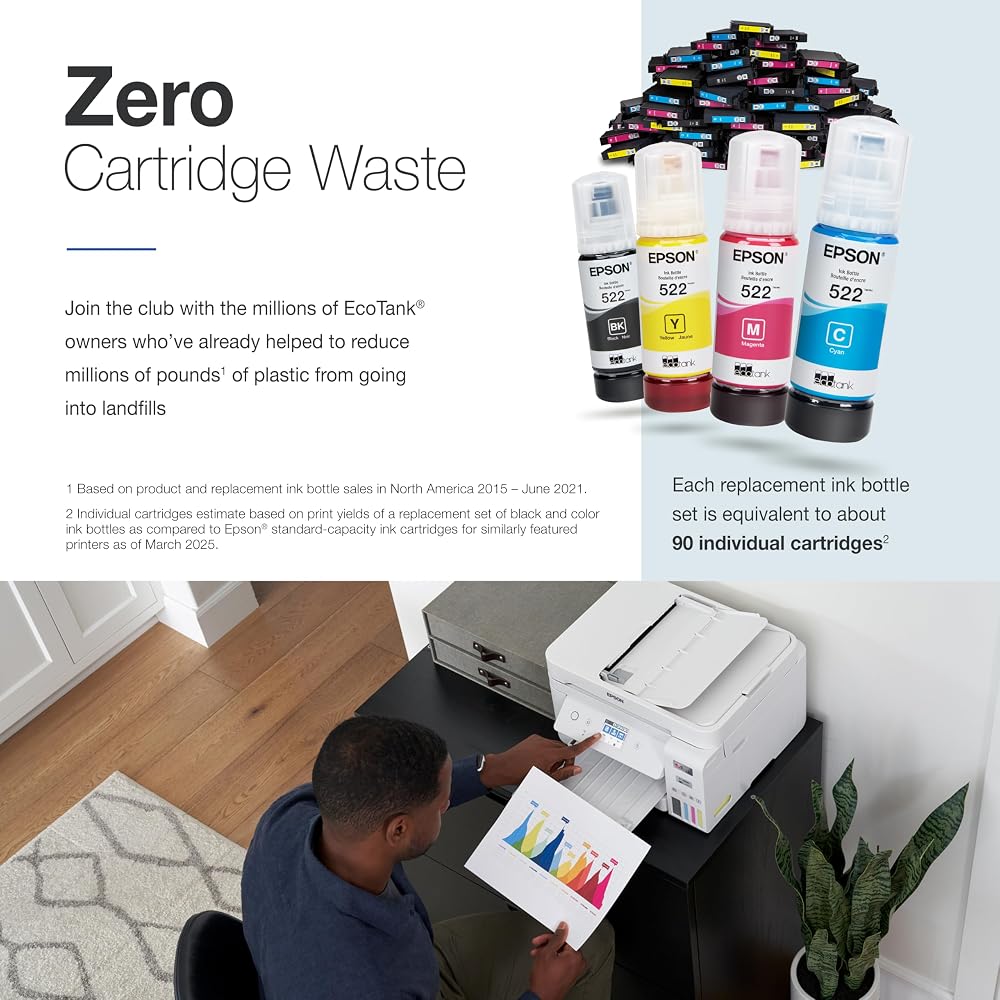
The standout characteristic of this all-in-one machine is its innovative cartridge-free printing architecture. Instead of relying on proprietary, low-yield plastic cartridges that generate persistent landfill clutter and demand regular replacements, the unit features built-in high-capacity ink tanks. Refilling these tanks is handled through Epson’s EcoFit ink bottle system, which uses uniquely keyed nozzles to prevent accidental color mixing and eliminate messy spills during top-ups.
When evaluating the epson ecotank 4800 ink capacity, the large built-in reservoirs mean creators can manage sizable print queues across months of routine administrative tasks without running dry. This high-capacity architecture ensures that remote workers returning from weeks on the road can print boarding passes, creative briefs, and client agreements without discovering dried-out or half-empty supplies. Furthermore, zero cartridge waste aligns well with conscious creators who aim to minimize disposable plastics in their personal workspaces.
Micro Piezo Heat-Free Print Engine

Document sharpness and consistency stem from the underlying Micro Piezo Heat-Free Technology. Unlike thermal inkjet systems that depend on extreme heat to eject droplets, this electromechanical method releases ink precisely without preheating the printhead. This mechanism reduces mechanical thermal stress, delivers instant start-up response, and ensures consistent droplet placement across long multi-page documents.
When considering epson ecotank 4800 photo printing and graphic rendering, the Micro Piezo engine achieves crisp monochrome typography alongside saturated color graphics. While the product specifications explicitly designate plain paper as the primary print media, the heat-free system maintains clean lines, preventing excessive bleed-through on standard sheets. Traveling visual creators who need to review color proofs, presentation decks, or reference graphics will appreciate the sharp clarity rendered on basic office paper.
Built-In Flatbed Scanner and Digital Copy Functions
Administrative workflows rely heavily on digitizing hard copies, receipts, legal waivers, and handwritten notes. The built-in scanner and copier combine a high-resolution flatbed surface with intuitive hardware buttons and a clear color display. This integrated color panel allows users to configure standalone copies, adjust scaling, and preview job settings without needing to wake up a connected laptop.
Looking at the epson ecotank 4800 scanner features, the flatbed configuration protects delicate original documents, travel receipts, and bound notebooks that cannot pass through sheet-fed slots. For document duplication, the unit achieves a maximum copy speed of ten pages per minute in black and white, supporting runs of up to one hundred consecutive copies per batch. This balance of scanning fidelity and copying speed provides ample utility for daily office management.
Wireless Integration and Voice Control
Modern studio desks demand clutter-free cable routing, especially for editors who keep portable hard drives such as a seagate expansion 8tb desktop drive nearby. The unit incorporates broad laptop compatibility along with an Android controller type, enabling flexible communication across modern personal computing environments.
Executing an epson ecotank et-4800 wireless setup allows creators to position the printer on a secondary credenza, closet shelf, or side counter away from the primary editing desk. In addition to conventional network links, the machine supports hands-free operation via voice control methods, streamlining quick tasks. Through epson ecotank 4800 mobile printing capabilities, users can dispatch documents straight from mobile handsets and tablets the moment they walk through the studio door.
Specs
Reviewing the official epson ecotank 4800 specs provides a clear view of how this all-in-one printer aligns with your workspace demands.
| Printer Type | Inkjet |
|---|---|
| Special Ink Feature | Refillable Supertank Reservoir (EcoFit system) |
| Output Capability | Color and Monochrome |
| Black and White Copy Speed | Up to 10 pages per minute |
| Scanner Type | High-resolution Flatbed |
| Maximum Copies Per Batch | 100 copies |
| Number of Paper Trays | 2 trays |
| Item Dimensions | 13.6 inches Deep by 14.7 inches Wide by 9.3 inches High |
| Item Weight | 11 pounds |
| Control & Ecosystem | Voice control, Android controller, Laptop compatible |
| Warranty | Limited warranty (1-year EU spare parts availability) |
Full spec sheet from the listing (40 entries)
| 0 | Printer Type, Inkjet |
|---|---|
| 1 | Other Special Features of the Product, Refillable Ink Tank |
| 2 | Printer Output Type, Color |
| 3 | Item Weight, 11 pounds |
| 4 | Item Dimensions D x W x H, 13.6"D x 14.7"W x 9.3"H |
| 5 | Controller Type, Android |
| 6 | Print media, Paper (plain) |
| 7 | Scanner Type, Flatbed |
| 8 | Maximum Copy Speed Black and White, 10 pages_per_minute |
| 9 | Compatible Devices, Laptops |
| 10 | Warranty Type, Limited |
| 11 | EU Spare Part Availability Duration, 1 years |
| 12 | Maximum Copies Per Run, 100 |
| 13 | Ink Color, Black |
| 14 | Additional Printer Functions, All In One |
| 15 | Control Method, Voice |
| 16 | Number of Trays, 2 |
| 17 | Processor Count, 1 |
| 18 | Display Type, LCD |
| 19 | Resolution, 5760 x 1440 |
| 20 | Color, White |
| 21 | Color Depth, 48 bits |
| 22 | Maximum print Resolution Color, 5760 x 1440 dots_per_inch |
| 23 | Maximum Print Resolution Black and White, 5760 x 1440 dots_per_inch |
| 24 | Power Consumption, 12 watts |
| 25 | Wattage, 12 watts |
| 26 | Duplex, Manual |
| 27 | Brand, Epson |
| 28 | Model Name, ET(EcoTank) ET-4800 |
| 29 | Model Number, C11CJ65201 |
| 30 | Built-In Media, EcoTank ET-4800 all-in-one, manual, CD-ROM for product setup, power cord, 1x bottle 522 Black (65 mL) and 1x bottle each 522 Cyan, Magenta, Yellow (65 mL) |
| 31 | Series Number, 65201 |
| 32 | Model Series, EcoTank |
| 33 | Specific Uses For Product, Home, Office |
| 34 | UPC, 010343940628 010343957879 |
| 35 | Global Trade Identification Number, 00010343940628 |
| 36 | Item Type Name, Inkjet Printer |
| 37 | Manufacturer, Epson |
| 38 | Warranty Description, 1-year limited warranty |
| 39 | Best Sellers Rank, #432 in Office Products (See Top 100 in Office Products) #3 in Ink Tank Printers |
Quoted from the product listing, not measured by us.
Epson EcoTank ET-4800 Pros and Cons
Pros
- Cartridge-free EcoFit refillable ink tanks
- Micro Piezo Heat-Free print technology
- Integrated flatbed scanner and copier
- Compact footprint at eleven pounds
- Dual paper trays for document handling
Cons
- Modest copy speed of ten monochrome pages per minute
- Listing specifies plain paper media only
- Requires stationary desktop power connection
Check Epson EcoTank ET-4800 on Amazon
Best Use Cases
- Home base administrative hub for freelance creators who require dependable, low-maintenance document output between work trips.
- Small studio desks where compact 13.6-inch by 14.7-inch epson ecotank 4800 dimensions maximize available surface area.
- Receipt, tax record, and contract digitizing utilizing the integrated high-resolution flatbed scanning platform.
- Multi-page monochrome and color copying projects requiring batches up to one hundred continuous sheets.
Before You Buy
Before integrating the epson ecotank 4800 for home office duties, it is essential to consider the physical setup and environmental constraints. Weighing eleven pounds with dimensions of 13.6 inches deep, 14.7 inches wide, and 9.3 inches high, the unit fits comfortably on compact shelving units or secondary sideboards. However, keep in mind that this is a mains-powered desktop printer rather than a portable travel accessory; it does not operate on rechargeable batteries and requires a stable AC power outlet. If your workspace demands automated double-sided printing, you might examine models like the epson ecotank 2850, as two-sided printing features are not detailed on this specific listing.
Prospective buyers should also examine media handling and bundle details. The manufacturer listing designates plain paper as the confirmed print media and outlines a dual-tray feed configuration, but it does not specify compatibility with heavy cardstock, specialty glossy photo sheets, or textured fine-art rag. Additionally, while the listing highlights black ink color in the data breakdown alongside color output functionality, it does not specify whether extra replacement ink bottles are bundled beyond the standard starter set. Users with complex corporate networks should note that while voice control, Android compatibility, and laptop connections are confirmed, specific wireless frequencies like 5 GHz are not stated.
How It Compares With Similar Picks
| Product | Best For | Key Difference |
|---|---|---|
| Epson EcoTank ET-4800 | Home studios wanting compact cartridge-free printing | Supertank refillable ink system with flatbed scanner and 10 ppm copy speed |
| HP DeskJet 2955 Wireless All-in-One | Light casual home use with cartridge trial service | Traditional inkjet design with 3 months Instant Ink trial and AI-capable label |
| Cost Efficient Multi-Function Photo Printer | Entry-level compact photo scanning and copying | Canon PIXMA TS4320 design emphasizing multi-function photo printing and quick setup |
| High-volume enterprise office printing | HP Color LaserJet Enterprise 4701dw with enterprise security and laser speeds |
Deciding between these options hinges on your document volume, ink philosophy, and available room. If your creative operations demand heavy, high-speed document output with enterprise network security, stepping up to a dedicated commercial laser printer like the Print option or exploring commercial tank options such as the epson ecotank pro et-5170 makes practical sense. On the other hand, users on minimalist budgets who only produce a handful of pages each quarter might prefer entry-level alternatives like the HP DeskJet 2955 Wireless All-in-One or the Cost Efficient Multi-Function Photo Printer. However, for a dependable balance of high ink yield, zero cartridge clutter, and modest dimensions, the ET-4800 holds a clear edge.

Bottom Line
Evaluating whether the epson ecotank 4800 is worth it comes down to how much you prioritize continuous readiness and hassle-free operation. For remote professionals, editors, and traveling creators who maintain a stationary work nook, dealing with dried cartridges and recurring consumable orders disrupts focus. The ET-4800 eliminates that frustration by combining high-capacity refillable tanks with a clean EcoFit bottle interface, ensuring that the printer remains ready to perform even after weeks of standing idle.
While it is not designed to fit inside a travel backpack or deliver blazing corporate-level output speeds, its eleven-pound chassis, dual paper trays, and flatbed scanning platform provide comprehensive day-to-day office utility. If you seek an efficient, cartridge-free color all-in-one printer that conserves desk space while handling regular documentation, the Epson EcoTank ET-4800 represents a sensible and reliable investment for your workspace.
FAQ
Does the Epson EcoTank ET-4800 require disposable ink cartridges?
No, the printer features a cartridge-free design that utilizes built-in refillable supertank reservoirs. Users refill the system directly using Epson EcoFit ink bottles, which feature keyed nozzles that prevent spills and eliminate cartridge waste.
What are the physical dimensions and weight of the Epson EcoTank ET-4800?
The printer measures 13.6 inches deep, 14.7 inches wide, and 9.3 inches high, and weighs 11 pounds. Its compact footprint makes it convenient to place on small office credenzas or shared studio desks.
How does the Epson EcoTank ET-4800 handle wireless and mobile workflows?
The listing highlights compatibility with laptops and Android controller devices, alongside voice control support. These options enable seamless document transmission without requiring a direct physical cable connection across your workspace.
What is the maximum copy speed and capacity of the integrated copier?
The unit delivers a maximum black and white copy speed of up to 10 pages per minute. The internal memory and copying architecture support batch runs of up to 100 copies in a single pass.
What print media types does the manufacturer listing confirm?
The Amazon product listing specifically designates plain paper as the confirmed print media. The manufacturer details do not specify compatibility with specialty photo papers, cardstock, or heavy media weights.
What buyers wrote
Quoted word for word from Amazon reviews. We did not edit them.
I am quite happy with my ET-4800 purchase. From wirelessly connecting to my Mac to software installation to adding the ink, it was easy to set up. I feel you can't go wrong with this level of ink capacity. It holds so much ink without the…
Bought the ET-4800 this past week from Amazon. I noticed that in the comments some reviewer noted that connectivity was a problem. That was not my experience. Set up was easy (and I'm a boomer). Found two videos from "printer insider" that talked me through it…
How this site works
- 194reviews published
- 2,323products with a buyer rating
- 2,260products with listed features
- 84brands covered
Ratings, prices, stock and specifications are read from the Amazon product listing. We do not run lab tests of our own, so a score here is the average rating left by buyers, not a verdict from a test bench. We track one retailer, so prices here are not a comparison.



