HP Omen 16 Review: Is This 5.4-Pound Rig Practical for Mobile Editors?
Finding a portable computing station capable of chewing through multi-layered video timelines without stalling often forces video editors into an uncomfortable compromise between raw capability and luggage weight. The HP Omen 16 enters the mobile creator space with an aggressive set of core components designed to process demanding creative workloads wherever an electrical outlet can…
By Noah Archer
10 min read


Reviewed
HP Omen 16
Our score
Liked
Based on listed specifications — not from testing of our own.
Price today
| Amazon | Not listed | View deal |
|---|
- Sold by Bright Spot (We record SN)
We track one retailer, so this is not a price comparison. Affiliate link; price and stock come from the listing and change without notice.
What you need to know
- The inclusion of 64 MB of Smart Cache allows the machine to maintain fluid responsiveness when managing large databases, indexing vast media libraries, or… HP Omen 16 Features Explained
- Operating as a compact, transportable desktop replacement for field editors connecting to color-accurate studio monitors. Best Use Cases
- Additionally, the standard baseline storage configuration provides a 512GB NVMe solid-state drive, which quickly fills when caching multi-gigabyte raw video assets… Before You Buy
- If your workflow involves massive render caches and dozens of memory-hungry browser tabs open alongside video suites, the Acer Nitro V 16S AI delivers double the… How It Compares With Similar Picks
- Packed with an AMD Ryzen 9 8940HX and dedicated RTX 5060 graphics, the laptop tears through background exports, multi-stream editing, and high-framerate gameplay… Bottom Line
One line lifted from each section below — follow the link to read that section in full.
As Amazon Associates, we earn from qualifying purchases. This means we may receive a small commission at no extra cost to you if you click through and make a purchase.
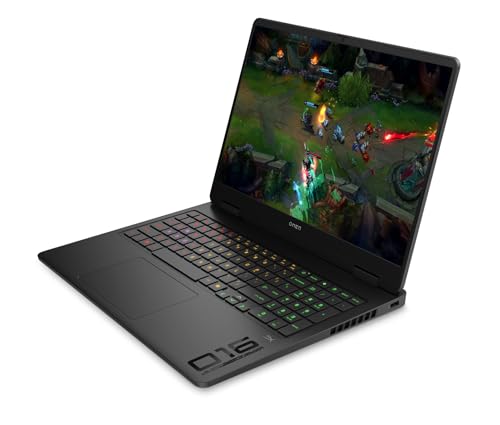
Finding a portable computing station capable of chewing through multi-layered video timelines without stalling often forces video editors into an uncomfortable compromise between raw capability and luggage weight. The HP Omen 16 enters the mobile creator space with an aggressive set of core components designed to process demanding creative workloads wherever an electrical outlet can be found. As mobile creators continually look for machines that bridge the gap between desktop workstations and field machines, this hp omen 16 2025 release targets editors who prioritize fast rendering, dense core counts, and dedicated graphical processing over ultra-slim profiles.
While the internal specifications offer undeniable computing throughput for complex project timelines, the physical footprint presents a distinct challenge for nomadic editors who travel light. Packing a desktop-class processor and a dedicated graphics module into a clamshell chassis results in noticeable thermal mass, substantial heft, and a demanding power profile that requires deliberate packing decisions. For traveling digital nomads and field editors, this laptop functions best as a transportable desktop replacement rather than an agile coffee-shop companion, delivering immense rendering speed once parked at a destination desk.
Quick Verdict
The HP Omen 16 balances workstation-tier rendering capabilities with genuine gaming utility, though its 5.4-pound physical frame and color-limited display panel demand specific operational compromises from traveling visual professionals.
- Exceptional multithreaded processing delivered by the 16-core AMD Ryzen 9 8940HX engine.
- Solid GPU acceleration for effects and timelines powered by the NVIDIA GeForce RTX 5060 8GB GDDR7 card.
- Heavy 5.4-pound chassis combined with a bulky 230-watt AC adapter strains lightweight travel kits.
- Restricted 62.5% sRGB color gamut coverage requires an external reference monitor for critical grading work.
HP Omen 16 Features Explained
AMD Ryzen 9 8940HX Processing Engine
At the mechanical center of this workstation sits the AMD Ryzen 9 8940HX processor, a computational engine sporting 16 physical cores and 32 threads capable of clock speeds reaching up to 5.3 GHz. The inclusion of 64 MB of Smart Cache allows the machine to maintain fluid responsiveness when managing large databases, indexing vast media libraries, or coordinating multi-camera timelines. In field-editing scenarios where video encoders must juggle high-bitrate footage alongside background rendering tasks, this hp omen 16 ryzen 9 configuration handles multithreaded bottlenecks with computational room to spare.
For audio engineers and visual effects specialists, having 32 simultaneous execution threads fundamentally shifts how project caching behaves away from a traditional studio environment. Complex digital audio workstations running numerous virtual instruments, alongside compositing suites managing particle simulations, benefit directly from this architecture. You can compare how this high-core-count configuration stacks against higher-tier graphic variations in our hp omen 16 rtx 5060 analysis, which explores similar hardware architectures in deep creative pipelines.
NVIDIA GeForce RTX 5060 Graphic Hardware
Graphics acceleration on the HP Omen 16 is managed by the dedicated NVIDIA GeForce RTX 5060 GPU backed by 8GB of modern GDDR7 video memory. This graphics processor accelerates hardware encoding engines, enabling real-time playback on complex color timelines, optical flow calculations, and 3D spatial renders. Because modern creative applications offload temporal noise reduction, sharpening passes, and tracking data to GPU compute units, the hp omen 16 rtx 5060 combination prevents the system from stuttering when applying layered effects to native video footage.
Beyond timeline scrubbing, the graphics subsystem provides sufficient headroom for off-hours high-framerate gaming and GPU-accelerated 3D modeling tasks. The dedicated video RAM ensures system memory remains unburdened during peak visual rendering spikes, maintaining stable system performance during intense export sequences. The architecture serves creators who want seamless visual responsiveness during project previews without waiting for pre-rendered proxies.
Display Characteristics and Color Capabilities
Visual output is handled by a 16.0-inch WUXGA display featuring a resolution of 1920 x 1200, an expansive 16:10 aspect ratio, and a brisk 144Hz refresh rate. The panel reaches 300 nits of brightness and incorporates an anti-glare coating that curbs reflections beneath the harsh overhead lighting commonly encountered in transit hubs, hotel rooms, and client offices. The added vertical pixel space granted by the 16:10 format provides meaningful utility for editing software, surfacing additional timeline tracks and audio channels without crowding the primary workspace.
However, chromatic performance remains a notable compromise for visual artists examining the hp omen 16 screen color accuracy, as the factory specification sits at 62.5% sRGB coverage. This limited color volume means the built-in screen cannot reproduce the extended hues found within standard web and broadcast palettes, creating a substantial hurdle for professional colorists who require strict grading precision on the road. Traveling editors relying on this machine must treat the internal panel as a cutting and timing monitor, leaning on external color-calibrated monitors when final color mastery is required.
Chassis Bulk and Traveling Ergonomics
Portability represents the central consideration for any mobile creative professional, and assessing the hp omen 16 weight reveals its distinct desk-bound leanings. The bare laptop checks in at 5.4 pounds, with outer dimensions measured at 14.07 inches long, 10.59 inches wide, and 1.12 inches thick (with retail listings citing up to 1.15 inches depending on rubber footings). When slipping this device into an everyday commuter pack, the dense footprint rapidly consumes interior compartment volume, leaving scarce room for camera lenses, microphones, or peripheral travel accessories.
The total transport load increases further when factoring in the included 230-watt AC charging brick and power cabling required to sustain full-draw performance. Travelers evaluating the hp omen 16 travel experience must factor in this total combined weight before embarking on lengthy foot commutes through foreign airports or remote field locations. As detailed in our review of the hp hyperx omen 16 platform, full-sized chassis dimensions offer superior heat dissipation at the clear expense of lightweight packing efficiency.
Battery System and Power Management
Field longevity is governed by an integrated 4-cell 83 Whr lithium-ion battery array fitted beneath the keyboard deck. While an 83 Whr capacity looks impressive on a spec sheet, fueling an aggressive 16-core processor alongside a dedicated discrete graphics processor consumes energy at an accelerated pace. Consequently, real-world hp omen 16 battery life shifts dramatically based on application load: lightweight word processing and offline document review allow extended untethered usage, whereas demanding timeline renders or continuous GPU computations deplete reserves rapidly.
To retain flexibility on the move, the chassis integrates a versatile USB 3.2 Gen 2 Type-C port that supports Power Delivery, DisplayPort alt-mode, 10Gbps data bandwidth, and power-off charging. This port allows travelers to inject emergency top-up power via compact third-party travel chargers when packing the full 230-watt adapter is impractical, provided the workflow remains focused on low-draw tasks. Nevertheless, unlocking peak clock speeds across both the CPU and GPU still requires plugging directly into wall power via the dedicated AC adapter.
Specs
The detailed hp omen 16 specs listed below highlight the core hardware, thermal provisions, and peripheral interfaces integrated into this custom-configured portable platform.
| Processor | AMD Ryzen 9 8940HX (16 Cores, 32 Threads, up to 5.3 GHz, 64 MB Smart Cache) |
|---|---|
| Graphics Processing Unit | NVIDIA GeForce RTX 5060 (8GB GDDR7 Dedicated VRAM) |
| System Memory | 16GB DDR5 SDRAM at 5200 MHz |
| Internal Storage | 512GB PCIe NVMe M.2 Solid State Drive |
| Display Panel | 16.0-inch WUXGA (1920 x 1200) IPS, 144Hz, 300 nits, Anti-glare |
| Color Gamut | 62.5% sRGB Coverage |
| Battery Hardware | 4-cell, 83 Whr Lithium-ion Polymer |
| Product Dimensions | 14.07 x 10.59 x 1.12 inches (Chassis listed up to 1.15 inches thick) |
| Total Weight | 5.4 lbs (Chassis only, excluding charging brick) |
| Included Accessories | 230W AC Power Adapter, 32GB External USB Flash Drive |
Full spec sheet from the listing (40 entries)
| 0 | Color, Shadow black |
|---|---|
| 1 | Hard-Drive Size, 512 GB |
| 2 | Operating System, Windows 11 Home |
| 3 | Other Special Features of the Product, Anti Glare Coating, Backlit Keyboard, HD Audio, Numeric Keypad |
| 4 | Graphics Description, Dedicated |
| 5 | Graphics Coprocessor, NVIDIA GeForce RTX 5060 |
| 6 | Hard Disk Description, SSD |
| 7 | Video Processor, NVIDIA |
| 8 | Specific Uses For Product, Gaming |
| 9 | Graphics Card Ram, 8 GB |
| 10 | Form Factor, Clamshell |
| 11 | Hard Disk Interface, PCIE x 4 |
| 12 | Compatible Devices, External displays, mice, keyboards, storage devices, headphones, and other accessories that use USB, HDMI, or wireless connectivity |
| 13 | Warranty Type, Limited |
| 14 | Item Dimensions L x W x Thickness, 14.09"L x 10.6"W x 1.15"Th |
| 15 | Optical Storage Device, No Optical Drive |
| 16 | Video Output, HDMI |
| 17 | Operating System Family, Windows |
| 18 | Screen Size, 16 inches |
| 19 | Resolution, 1920 x 1200 |
| 20 | Native Resolution, 1920 x 1200 pixels |
| 21 | Display Type, LED |
| 22 | Display Resolution Maximum, 1920×1200 pixels |
| 23 | Display Technology, LED |
| 24 | Display Refresh Rate in Hertz, 144 |
| 25 | Touch Screen Type, No Touchscreen |
| 26 | Display Maximum Resolution, 1920×1200 |
| 27 | Connectivity Technology, Wi-Fi |
| 28 | Wireless Technology, Wi-Fi |
| 29 | Wireless Compability, 802.11ax |
| 30 | Total Usb Ports, 4 |
| 31 | Number of Ports, 7 |
| 32 | Total Number of HDMI Ports, 1 |
| 33 | Audio Output Type, Speakers |
| 34 | Processor Series, Ryzen 9 |
| 35 | Processor Speed, 2.6 GHz |
| 36 | Processor Count, 16 |
| 37 | Processor Brand, AMD |
| 38 | CPU Model Number, AMD Ryzen 9 8940HX |
| 39 | CPU Model Speed Maximum, 5300 MHz |
Quoted from the product listing, not measured by us.
HP Omen 16 Pros and Cons
Pros
- 16-core AMD Ryzen 9 8940HX computational power
- Dedicated NVIDIA GeForce RTX 5060 graphic acceleration
- Generous 83 Whr internal battery pack
- Comprehensive port selection with HDMI 2.1 and Type-C
- Fluid 144Hz WUXGA 16:10 anti-glare panel
Cons
- Substantial 5.4-pound bare chassis weight
- Limited 62.5% sRGB display color coverage
- Base storage capacity limited to 512GB SSD
- No integrated SD card reader
Best Use Cases
- Rough-cutting multi-stream video sequences and proxy editing inside hotel rooms or temporary production offices.
- Operating as a compact, transportable desktop replacement for field editors connecting to color-accurate studio monitors.
- Managing high-track-count digital audio workstations and multichannel podcast recording sessions on location.
- Compiling software code bases and managing intensive virtual development environments while traveling.
- High-framerate gaming at 1080p and 1200p resolutions during evening down-time between work assignments.
Before You Buy
Before purchasing this specific machine, potential buyers must note that the retailer listing explicitly indicates custom configuration services: original packaging may have been unsealed to perform internal hardware upgrades and validation testing prior to resealing. Additionally, the standard baseline storage configuration provides a 512GB NVMe solid-state drive, which quickly fills when caching multi-gigabyte raw video assets or massive sound libraries. Those contemplating using the hp omen 16 for video editing must anticipate relying heavily on external drives connected via high-speed ports or planning for aftermarket internal storage additions later.
Physical peripheral compatibility remains robust, offering a full-size HDMI 2.1 port, RJ-45 Gigabit Ethernet, a 10Gbps USB Type-C port, a 10Gbps USB Type-A port, and two 5Gbps USB Type-A ports alongside a headphone/mic combo jack. However, nomadic creators should observe that the chassis lacks an integrated full-size or microSD card reader, making an external dongle necessary for offloading camera cards. While desktop creators investing in stationary power often weigh platforms like the gaming pc hp omen, field workers must determine if the physical bulk and dongle requirements align with their packing allowances.
How It Compares With Similar Picks
Evaluating this machine against alternative laptops provides clarity on how its specific balance of computing power, visual display hardware, and travel bulk positions it among portable systems.
| Product | Best For | Key Difference |
|---|---|---|
| HP Omen 16 | Heavy multithreaded rendering and dual-purpose mobile workflows | 16-core Ryzen 9 8940HX paired with RTX 5060, 83 Whr battery, and 5.4 lb chassis weight |
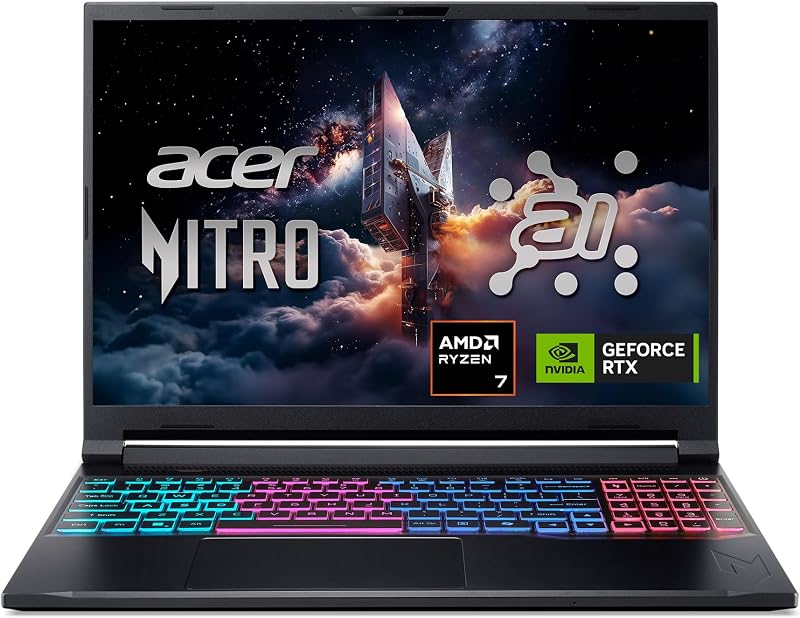
| Acer Nitro V 16S AI | High-memory editing tasks needing larger local storage out of the box | Features 32GB DDR5 memory, a larger 1TB SSD, and a faster 180Hz display driven by an AMD Ryzen 7 260 processor |
| msi Cyborg 17 17.3″ FHD | Stationary editors who prefer a massive screen canvas over bag portability | Larger 17.3-inch display format with an Intel Core 9-270H CPU and a 2TB dual-storage package |
| KAIGERR Gaming Laptop | Ultra-budget travelers handling lightweight timeline cuts and admin duties | Lower-tier AMD Ryzen 7430U processor with integrated graphics, DDR4 memory, and simpler hardware |
Choosing an alternative from this list makes sense depending on the distinct compromises an editor is prepared to make. If your workflow involves massive render caches and dozens of memory-hungry browser tabs open alongside video suites, the Acer Nitro V 16S AI delivers double the memory and storage capacity without requiring custom upgrades. On the other hand, if your assignments involve stationary setups with minimal room-to-room transitions, the msi Cyborg 17 17.3″ FHD provides a significantly larger working canvas. Budget-constrained travelers who solely need basic video cutting without dedicated GPU acceleration can look toward the KAIGERR Gaming Laptop to keep their gear profile simpler.
Bottom Line
Determining whether the hp omen 16 portability fits your travel routine hinges entirely on how you balance physical carrying mass against raw processing speeds. Packed with an AMD Ryzen 9 8940HX and dedicated RTX 5060 graphics, the laptop tears through background exports, multi-stream editing, and high-framerate gameplay with remarkable ease. It serves as a formidable workhorse once established at a desk, offering expansive physical connectivity and dependable cooling headroom for sustained computing workloads.
Ultimately, if you are asking yourself is hp omen 16 worth it for your daily production travel, the answer rests on your tolerance for packing weight and display hardware limitations. The 5.4-pound chassis, substantial AC power brick, and 62.5% sRGB screen mean you are not purchasing a casual travel notebook, but rather a condensed workstation. For editors who routinely grade footage on external studio monitors and prioritize rapid export turnarounds over ultra-light baggage, the HP Omen 16 delivers muscular performance that justifies its physical footprint.
FAQ
Can the HP Omen 16 be charged over USB-C while working in the field?
Yes, the included USB 3.2 Gen 2 Type-C port supports Power Delivery as well as DisplayPort alt-mode and power-off charging. While this connection allows you to trickle-charge the battery using compatible compact adapters, the system requires the primary 230-watt AC barrel adapter to unlock maximum clock speeds on the CPU and GPU during intense rendering runs.
Is the built-in display accurate enough for final broadcast color grading?
The 16.0-inch 144Hz panel covers approximately 62.5% of the sRGB color space, which is adequate for offline editing, timeline pacing, and gaming, but insufficiently broad for color-critical correction. Professional editors should output video feeds to a color-calibrated external display via the integrated HDMI 2.1 or DisplayPort-capable USB-C port for mastering final deliverables.
Does the HP Omen 16 have a built-in SD card slot for quick media offloading?
The chassis does not include an integrated full-size SD or microSD card reader. Traveling photographers and videographers will need to pack an external USB-C or USB-A card reader to ingest footage from their cameras onto the internal 512GB solid-state drive.
How does the 5.4-pound weight affect everyday backpack travel?
Carrying the 5.4-pound laptop along with its 230-watt charging brick pushes total kit weight past 7 pounds before counting cameras or accessories. It fits into standard 16-inch laptop bags, but the combined heft makes it better suited for vehicle transit or basecamp setups rather than prolonged walking journeys.
Can I upgrade the internal memory and storage on this laptop?
The system utilizes standard DDR5 SDRAM operating at 5200 MHz and an M.2 PCIe NVMe solid-state drive interface. The retailer listing notes that this model may be opened and upgraded prior to shipment, confirming that these core components use standard modular slots accessible for maintenance or expansion.
How this site works
- 623reviews published
- 2,323products with a score
- 2,260products with listed features
- 84brands covered
Prices, stock and specifications are read from the Amazon product listing. We do not run lab tests of our own; scores are out of 10, based on listed specifications and buyer feedback, not a verdict from a test bench. We track one retailer, so prices here are not a comparison.


