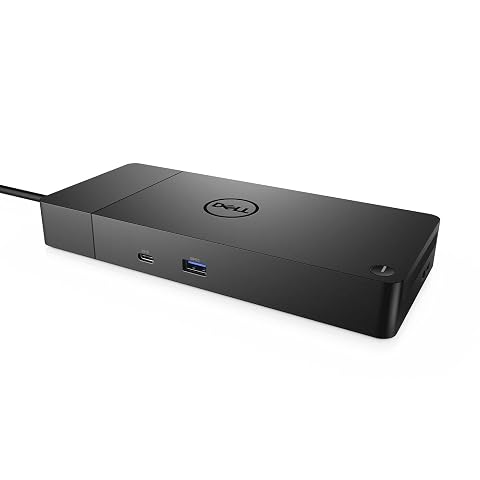
HP USB-C/A Universal Dock G2: The Mobile Editor’s Hub Breakdown
Mobile content creators, travelling video editors, and on-location photographers frequently struggle with connecting multiple external screens, high-speed storage, and wired networks while working out of hotel rooms or temporary production spaces. When moving between field shoots and mobile edit suites, finding a hub that handles heavy workstation displays without requiring dedicated proprietary hardware across mixed…
9 min read


Reviewed
HP USB-C/A Universal Dock G2
Our score
Liked
Based on listed specifications — not from testing of our own.
Price today
| Amazon | Not listed | View deal |
|---|
- Prime eligible
- Sold by TECHNOLOGY SUPPLY EXCHANGE, shipped by Amazon
We track one retailer, so this is not a price comparison. Affiliate link; price and stock come from the listing and change without notice.
What you need to know
- This architecture allows the dock to support up to three 4K displays when using modern USB-C systems, or up to two 4K displays when running through the included… HP USB-C/A Universal Dock G2 Features Explained
- Ingesting multi-camera media across several external USB drives while connected to high-speed wired local network Ethernet. Best Use Cases
- This driver requirement is especially relevant for macOS users, where proper permissions must be granted within system settings for external displays to output… Before You Buy
- If your travel workflow requires direct SD card ingestion without external readers, the Dual HDMI USB C Dock makes an appealing lightweight choice, though it… How It Compares With Similar Picks
- At 1.5 pounds and occupying 13 by 9 by 3 inches of luggage space, it is undeniably bulkier than basic USB-C dongles. Bottom Line
One line lifted from each section below — follow the link to read that section in full.
As Amazon Associates, we earn from qualifying purchases. This means we may receive a small commission at no extra cost to you if you click through and make a purchase.
Mobile content creators, travelling video editors, and on-location photographers frequently struggle with connecting multiple external screens, high-speed storage, and wired networks while working out of hotel rooms or temporary production spaces. When moving between field shoots and mobile edit suites, finding a hub that handles heavy workstation displays without requiring dedicated proprietary hardware across mixed computer fleets is a major challenge. The HP USB-C/A Universal Dock G2 addresses this exact problem by delivering universal workstation connectivity across modern USB-C laptops and legacy USB-A machines alike. In an on-the-go editorial workflow where packing light and avoiding hardware conflicts matters, having one docking unit capable of driving external displays, Ethernet, and peripherals across different computer brands eliminates the headache of packing a tangle of loose adapters.
Our verdict on this dock comes down to workflow versatility versus packability. While measuring 13 inches by 9 inches by 3 inches and weighing 1.5 pounds makes it noticeably larger than pocket-sized adapters like the hyperdrive 6-in-2 usb-c hub, its robust DisplayLink architecture and single-cable deployment solve the multi-monitor challenges that travel editors consistently face. For editors working across varied laptop hardware on the road who need dependable workstation anchoring, it presents a functional bridge between portable flexibility and desktop-level productivity.
Quick Verdict
This hp usb-c a universal dock g2 review reveals a sturdy workstation dock designed to streamline multi-device mobile setups, offering comprehensive single-cable docking and legacy support for production crews who carry varied machine types.
- Universal cross-platform compatibility across HP, Apple, Dell, and Lenovo machines powered by DisplayLink technology.
- Up to 100 watts of power delivery over a single connection to keep performance laptops charged during heavy editing export runs.
- Multi-monitor support offering connections for up to three displays via HDMI and DisplayPort outputs.
- Included USB-A adapter ensuring full backward compatibility for older portable computers.
HP USB-C/A Universal Dock G2 Features Explained
DisplayLink Multi-Monitor Output
One of the primary considerations for video editors on location is running extra screen real estate for timelines, media bins, and color grading preview monitors. The HP USB-C/A Universal Dock G2 is driven by DisplayLink technology, which circumvents native graphic lane limitations on host notebooks. This architecture allows the dock to support up to three 4K displays when using modern USB-C systems, or up to two 4K displays when running through the included USB-A adapter. Having an integrated HDMI port alongside DisplayPort outputs gives editors the flexibility to connect production field monitors and hotel displays without stacking loose converters.
For those questioning hp dock g2 displaylink compatibility, the software-driven video transport ensures that an hp dock g2 for macbook or Windows setup can send display data reliably across standard USB interfaces. When setting up an hp universal dock g2 dual monitor arrangement in a field workspace, content editors benefit from a consistent visual workstation layout regardless of whether their operating system natively supports multi-stream transport over USB-C.
100-Watt Power Delivery Over a Single Cable
Editing raw footage, scrubbing complex timelines, and rendering effects places enormous continuous draw on notebook batteries. The dock delivers up to 100 watts of charging power over a single USB-C cable to compatible host notebooks. This high wattage capacity ensures that power-hungry creative laptops maintain full performance state without depleting their charge or throttling processing speeds during demanding timeline playback. Having hp universal dock g2 100w charging integrated into the dock means travel creators can leave secondary machine power bricks stowed away, reducing overall gear clutter at the desk.
The convenience of single-cable connectivity extends to tear-down and setup speed. When packing up from a mobile editing station, unplugging a single USB-C line instantly disconnects all peripherals, network interfaces, and display feeds at once. When comparing this deployment to modular pocket splitters like the anker nano usb-c hub, the dedicated 100-watt passthrough power provided by this HP unit provides far greater stability for sustained export sessions.
Comprehensive Port Layout and Legacy Adaptation
In terms of physical connectivity, the dock houses a total of 10 ports, including six USB ports (featuring four USB 3.0 connections along with USB-C), an RJ-45 Gigabit Ethernet port, one HDMI port, and DisplayPort interfaces. For travel editors transferring terabytes of b-roll from high-speed external solid-state drives, having multiple dedicated USB ports allows concurrent ingestion from card readers and scratch drives without port swapping. The dedicated wired network port ensures stable upload speeds for cloud collaborative workflows and offloading daily rushes to remote studio servers.
Legacy system support is another hallmark of this device. HP includes a specialized USB-A adapter that attaches to the host cable, allowing legacy notebooks lacking modern USB-C ports to connect directly to the dock and access attached peripherals and dual displays. The listing also notes compatibility with the optional HP 4.5 mm and USB-C Dock Adapter G2 for legacy barrel power setups, expanding utility for production crews operating older fleet machinery.
Compact Desktop Footprint for Mobile Production
While full-sized desktop docks can often dominate a workstation, this unit is engineered with a compact chassis designed to keep workspace clutter to a minimum. Measuring 13 inches long by 9 inches wide and 3 inches high with a total item weight of 1.5 pounds, it fits neatly on temporary studio desks, folding location tables, or compact hotel desks. The black wired build integrates cleanly into existing technical gear configurations, keeping high-bandwidth display and drive cables routed behind the laptop.
For creators planning an hp usb-c universal dock g2 travel kit, the enclosed casing provides adequate rigidity to withstand transport inside gear cases. Although it carries a larger profile than pocket-sized adapters, its all-in-one port selection eliminates the necessity of carrying separate Ethernet dongles, display adapters, and powered USB hubs, balancing physical dimensions with broad technical utility.
Specs
Evaluating the hp usb-c/a universal dock g2 specs illustrates how HP packed extensive workstation utility into this desktop chassis.
| Model Number | 5TW13AA#ABA |
|---|---|
| Brand & Manufacturer | HP Inc. |
| Total Ports | 10 |
| Total USB Ports | 6 (including 4 x USB 3.0 and USB-C) |
| Display Outputs | 1 x HDMI, DisplayPort |
| Maximum Displays Supported | 3 Displays (up to 4K on USB-C; up to 2 displays via USB-A) |
| Power Output | 100 Watts |
| Networking | RJ-45 Ethernet Port |
| Hardware Compatibility | HP, Apple, Dell, Lenovo (USB-A, USB-C, Thunderbolt notebooks) |
| Dimensions & Weight | 13"L x 9"W x 3"H; 1.5 lbs |
Full spec sheet from the listing (25 entries)
| 0 | Hardware Interface, USB |
|---|---|
| 1 | Compatible Devices, Compatible Brands: HP, Apple, Dell, Lenovo |
| 2 | Total Usb Ports, 6 |
| 3 | Number of Ports, 10 |
| 4 | Total Number of HDMI Ports, 1 |
| 5 | Wattage, 100 watts |
| 6 | Item Dimensions L x W x H, 13"L x 9"W x 3"H |
| 7 | Item Weight, 1.5 pounds |
| 8 | Color, Black |
| 9 | Brand, HP |
| 10 | Number of Items, 1 |
| 11 | Number of Packs, 1 |
| 12 | Global Trade Identification Number, 00193905522323 |
| 13 | UPC, 193905522323 |
| 14 | Manufacturer, HP Inc. |
| 15 | Built-In Media, USB-C/A Universal Dock G2 |
| 16 | Item Type Name, Docking Station |
| 17 | Model Number, 5TW13AA#ABA |
| 18 | Mfr Part Number, 5TW13AA#ABA |
| 19 | Warranty Description, One-year limited warranty. |
| 20 | Best Sellers Rank, #3,095 in Computers & Accessories (See Top 100 in Computers & Accessories) #267 in Laptop Docking Stations |
| 21 | ASIN, B07YYF6BH9 |
| 22 | Total USB Ports, 6 |
| 23 | Product Dimensions, 13"L x 9"W x 3"H |
| 24 | Total HDMI Ports, 1 |
Quoted from the product listing, not measured by us.
HP USB-C/A Universal Dock G2 Pros and Cons
Pros
- Up to 100W single-cable power delivery
- Supports up to three external displays
- Universal DisplayLink cross-platform compatibility
- Included USB-A adapter for legacy laptops
- Ten total functional connectivity ports
Cons
- Requires DisplayLink driver installation
- Weighs 1.5 pounds in travel bags
- Provides only one built-in HDMI port
Check HP USB-C/A Universal Dock G2 on Amazon
Best Use Cases
- Building a temporary dual-monitor video editing suite in hotel workspaces using an Apple or Windows laptop.
- Ingesting multi-camera media across several external USB drives while connected to high-speed wired local network Ethernet.
- Managing mixed-brand production equipment where some team members use USB-C machines and others use legacy USB-A laptops.
- Anchoring a semi-permanent on-location DIT production cart that demands single-cable disconnect for rapid laptop mobility.
Before You Buy
Before ordering this unit, verify your computer operating system and hardware drivers. Because the HP USB-C/A Universal Dock G2 relies on DisplayLink technology to transmit video over USB interfaces, users must download and install the required DisplayLink drivers on their host machine to enable external monitor functionality. This driver requirement is especially relevant for macOS users, where proper permissions must be granted within system settings for external displays to output properly. While the dock provides broad compatibility with HP, Apple, Dell, and Lenovo machines across USB-C, Thunderbolt, and USB-A connections, it does not function strictly as a driverless plug-and-play video hub.
Additionally, examine what is supplied with the listing and what accessories remain optional. The unit comes equipped with an attached host cable and an included USB-A adapter for legacy connections. However, the listing does not specify whether extra display cables (such as HDMI or DisplayPort cords) are packed inside the box, so you will need to pack your own monitor interconnects. Furthermore, while the description mentions that legacy barrel-charging systems can utilize the optional HP 4.5 mm and USB-C Dock Adapter G2, that specific adapter is sold separately and is not included with this core dock package.
How It Compares With Similar Picks
| Product | Best For | Key Difference |
|---|---|---|
| HP USB-C/A Universal Dock G2 | Mixed legacy and modern multi-monitor mobile editing setups | Features DisplayLink technology, 100W charging, 10 ports, and an included USB-A adapter for legacy laptop compatibility. |
| Dual HDMI USB C Dock | Travelers wanting integrated memory card slots and lighter carry | Offers 85W max power delivery pass-through and built-in SD/TF card readers, but charger is not included in the package. |
| Universal Dock | Fixed office environments requiring quad-monitor output | Focuses on quad-display support and plug-and-play office readiness with 100W USB-C power delivery. |
| for Windows and Mac | Dual HDMI setups centered on legacy USB 3.0 workstation connectivity | Provides dual HDMI video outputs alongside 6 USB ports and audio jacks with driver-required operation. |
Choosing between these options depends on your workflow requirements and packing constraints. If your travel workflow requires direct SD card ingestion without external readers, the Dual HDMI USB C Dock makes an appealing lightweight choice, though it provides 85W instead of 100W and leaves out the dedicated power supply. For stationary production studios that demand four simultaneous screens, a quad-display solution like the dell pro laptop docking station wd25, usb-c, 100w, displayport, hdmi or the belkin connect 11-in-1 universal usb-c pro dock offers alternative multi-stream setups. However, when working across mixed computer fleets containing both modern USB-C laptops and older USB-A computers, the HP USB-C/A Universal Dock G2 remains the most versatile universal bridge.

Bottom Line
Deciding if an hp usb-c a dock g2 portable setup fits your travel production workflow comes down to balancing weight against versatility. At 1.5 pounds and occupying 13 by 9 by 3 inches of luggage space, it is undeniably bulkier than basic USB-C dongles. However, that physical footprint houses a true desktop-class expansion platform featuring 100-watt power delivery, ten total connection ports, and dependable DisplayLink multi-monitor output that operates cleanly across HP, Apple, Dell, and Lenovo systems.
So, is hp universal dock g2 worth it for travelling creators? If you regularly find yourself editing video in temporary field locations where multiple large monitors, wired gigabit networking, and sustained high-wattage power are essential, this dock eliminates the instability of chaining multiple compact dongles together. It provides reliable, workstation-grade connectivity in a single consolidated package that easily justifies its place in an on-location editor’s gear bag.
FAQ
Can the HP USB-C/A Universal Dock G2 charge my laptop while editing?
Universal Dock
Yes, the dock provides up to 100 watts of power delivery over a single USB-C connection to compatible host notebooks, keeping high-performance editing laptops powered during intense rendering sessions.
Does this docking station support dual monitors on Apple MacBook computers?
Yes, because the dock uses DisplayLink technology rather than native multi-stream transport, it can drive multiple independent external displays on compatible Apple MacBook models once the appropriate DisplayLink software is installed.
How does the dock connect to older laptops that lack USB-C ports?
The dock includes a specialized USB-A adapter that attaches to the host connection cable, enabling backward compatibility with legacy USB-A notebooks for peripheral access and dual 4K monitor output.
How many displays can be connected simultaneously to the dock?
The dock supports up to three displays when connected to a compatible USB-C laptop, or up to two 4K displays when connected via the legacy USB-A adapter.
Are display cables included in the box with the docking station?
The listing does not specify whether monitor cables like HDMI or DisplayPort interconnects are included in the retail box, so users should pack their own cables for on-location setups.
How this site works
- 607reviews published
- 2,323products with a score
- 2,260products with listed features
- 84brands covered
Prices, stock and specifications are read from the Amazon product listing. We do not run lab tests of our own; scores are out of 10, based on listed specifications and buyer feedback, not a verdict from a test bench. We track one retailer, so prices here are not a comparison.