Kodak Mini 2 Retro Review: The Ultimate Pocket Photo Printer for Travelers
Preserving travel memories often turns into a chore when digital photos remain trapped inside a smartphone camera roll for months after returning home. For backpackers, journalers, and minimalist travelers, carrying bulkier gear or dealing with temperamental instant film cameras can add unwanted heft to an ultralight daypack. The Kodak Mini 2 Retro tackles this challenge…
9 min read


Reviewed
Kodak Mini 2 Retro
Our score
Liked
Based on listed specifications — not from testing of our own.
Price today
| Amazon | Not listed | View deal |
|---|
- Sold by Kodak Photo Printer, shipped by Amazon
We track one retailer, so this is not a price comparison. Affiliate link; price and stock come from the listing and change without notice.
What you need to know
- At the heart of the Kodak Mini 2 Retro is genuine 4PASS dye-sublimation technology. Kodak Mini 2 Retro Features Explained
- Sharing spontaneous credit-card-sized prints with friends, family, or travel companions at hostels, social gatherings, and pop-up parties. Best Use Cases
- Before purchasing the Kodak Mini 2 Retro for travel, pay close attention to device compatibility and functional boundaries. Before You Buy
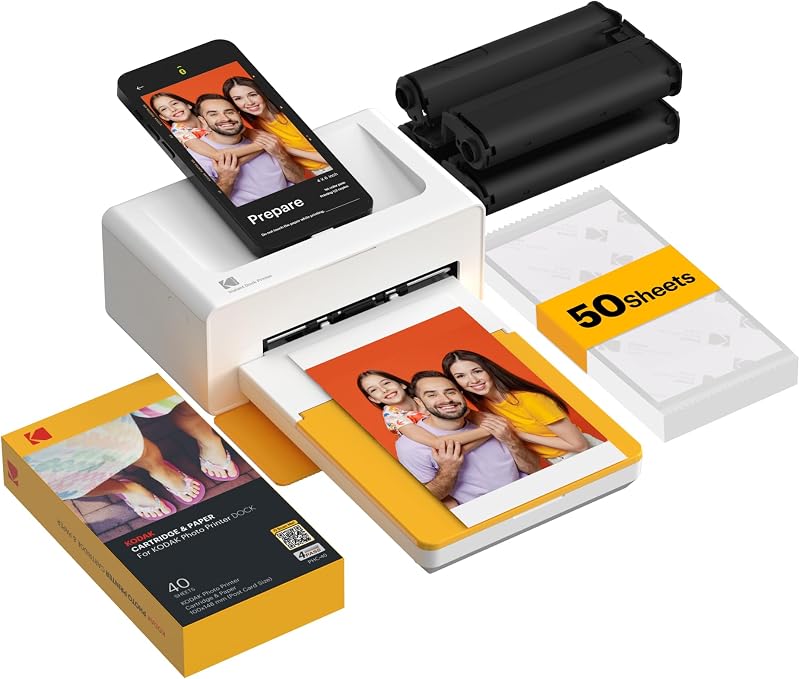
- If your goal is to print postcard-sized 4x6 images at a basecamp or home desk, stationary models like the Bluetooth KODAK Dock Plus or Liene M100 provide… How It Compares With Similar Picks
- While you will need to rely entirely on your smartphone for image editing and keep an eye on battery levels during long excursions, its light 255-gram weight makes… Bottom Line
One line lifted from each section below — follow the link to read that section in full.
As Amazon Associates, we earn from qualifying purchases. This means we may receive a small commission at no extra cost to you if you click through and make a purchase.
Preserving travel memories often turns into a chore when digital photos remain trapped inside a smartphone camera roll for months after returning home. For backpackers, journalers, and minimalist travelers, carrying bulkier gear or dealing with temperamental instant film cameras can add unwanted heft to an ultralight daypack. The Kodak Mini 2 Retro tackles this challenge directly by offering an ultra-compact dye-sublimation system that produces durable, credit-card-sized prints directly from your mobile device while out in the field. As a dedicated kodak mini retro printer, it emphasizes simple mobile operation, a compact footprint, and laminated output designed to withstand life on the road.
Our assessment reveals that this portable unit hits an impressive sweet spot for mobile creatives who value physical keepsakes without sacrificing pack space. While it lacks desktop connectivity and does not specify its exact milliamp-hour battery capacity, the combination of pocket-friendly dimensions and resilient four-layer printing makes it a standout choice for travelers who want tangible photos on the go.
Quick Verdict
The Kodak Mini 2 Retro delivers exceptional travel utility for anyone who wants clean, laminated snapshots on demand without hauling heavy gear. By utilizing a dedicated thermal dye-sublimation process rather than inkless zinc sheets, it produces rich color depth and instant protection against water and fingerprints.
- True 4PASS dye-sublimation prints with an integrated protective lamination overlay.
- Ultralight 255-gram build that slips easily into a coat pocket, sling bag, or daypack.
- Seamless wireless Bluetooth pairing for iOS and Android smartphone users.
- Convenient starter bundle containing four cartridges and 38 sheets of photo paper.
Kodak Mini 2 Retro Features Explained
Four-Pass Dye Sublimation Process
At the heart of the Kodak Mini 2 Retro is genuine 4PASS dye-sublimation technology. Unlike traditional inkjet printers that spray liquid droplets or instant cameras that use chemical films, this machine transfers color ribbons onto glossy photo paper using heat. During the printing sequence, the paper travels back and forth through the unit four separate times. It applies yellow, magenta, and cyan layers sequentially using a CMYK color scheme before laying down a final transparent protective coat.
This fourth lamination pass fundamentally elevates the kodak mini retro print quality. The clear top layer locks out moisture, resists dust, and shields the image from skin oils and fingerprints immediately as it ejects. Kodak notes that each finished photo emerges in approximately 55 seconds. For travelers who slide freshly minted pictures directly into a travel journal, wallet, or backpack sleeve, this quick-drying lamination ensures the print will not smudge, bleed, or degrade over time.
Pocket-Sized Form Factor and Weight
When selecting a portable photo printer for travel, weight and bulk are critical factors. The Kodak Mini 2 Retro measures just 3 inches deep, 5 inches wide, and 1 inch thick, maintaining a rectangular profile reminiscent of a compact external hard drive. At only 255 grams, it adds negligible heft to your everyday carry, allowing mobile photographers to pack light without leaving creative tools behind.
Its exterior features rounded corners and tactile ribbed accents that offer a secure hand grip while working outdoors or standing in crowded transit hubs. The single output slot feeds and retrieves the 2.1 x 3.4-inch sheets smoothly during the multi-pass printing cycle. Because it functions entirely via internal components without external ink reservoirs, travelers can store the unit flat inside a packing cube or upright in a side water bottle pocket without worrying about liquid leaks.
KODAK Photo Printer App Setup and Wireless Control
Operational simplicity is essential when printing on the move, and the kodak photo printer app setup keeps technical friction to a minimum. The printer connects wirelessly via Bluetooth to compatible iOS and Android smartphones. Once paired, the proprietary app functions as the command center for selecting pictures, adjusting composition, and initiating prints.
Within the mobile application, users can crop images, apply color filters, adjust brightness, and add decorative borders or stickers before sending the file to the queue. Because the hardware relies strictly on app control without a built-in display screen or memory card reader, your smartphone screen provides total control over image framing. The wireless handoff occurs within seconds, making spontaneous printing at a cafe, hotel lobby, or scenic overlook quick and predictable.
Credit-Card Sized Glossy Prints
The unit outputs photos measuring 2.1 x 3.4 inches, perfectly mirroring the standard dimensions of a credit card or business card. This media sizing makes the prints exceptionally versatile for everyday keepsakes. They slide seamlessly into transparent wallet sleeves, luggage tags, passport covers, and compact daily planners without requiring trimming or custom cutting.
The glossy photo paper features a firm, premium backing that feels durable in hand compared to flimsy receipt paper or adhesive stickers. For scrapbooking enthusiasts, pairing this device with genuine kodak mini 2 retro paper cartridges ensures consistent mechanical feeding through the internal roller mechanism and prevents unwanted color shifts across different print batches.
Power and Daily Portability Considerations
Assessing the kodak mini 2 retro battery life requires understanding its operational design. While Kodak highlights the unit as a completely portable printer intended for use anytime and anywhere, the official listing does not specify the exact milliamp-hour capacity of the built-in rechargeable battery or the exact number of sheets it can produce on a single charge.
Charging is handled through a modern USB Type-C port, matching the cable standard used by modern smartphones, tablets, and travel power banks. This universal charging connection means you do not have to pack proprietary AC wall adapters. Road warriors can easily top up the printer between photo sessions using a standard portable power pack while riding trains or relaxing at an airport terminal.
Specs
| Printer Type | Dye Sublimation (4PASS) |
|---|---|
| Color Output | Color (CMYK Ribbon) |
| Print Resolution | 291 x 300 dpi |
| Maximum Media Size | 2.1 x 3.4 inches (Credit Card Size) |
| Print Speed | Approximately 55 seconds per print (1 ppm rated) |
| Dimensions (D x W x H) | 3 x 5 x 1 inches |
| Item Weight | 255 g (approx. 0.56 lbs) |
| Maximum Sheet Capacity | 15 sheets |
| Connectivity | Wireless Bluetooth |
| Compatible Operating Systems | iOS, Android |
| Included In Bundle | Mini 2 Retro, 4 cartridges, 38 sheets paper, USB-C cable, user guide |
Full spec sheet from the listing (40 entries)
| 0 | Printer Type, Dye Sublimation |
|---|---|
| 1 | Other Special Features of the Product, APP Control, Anti-Fingerprint, Portable, Waterproof |
| 2 | Printer Output Type, Color |
| 3 | Item Weight, 255 g |
| 4 | Item Dimensions D x W x H, 3"D x 5"W x 1"H |
| 5 | Controller Type, Android, iOS |
| 6 | Print media, Glossy photo paper |
| 7 | Scanner Type, Photo, Portable |
| 8 | Maximum Copy Speed Black and White, 1 pages_per_minute |
| 9 | Compatible Devices, Smartphones |
| 10 | Ink Color, CMYK |
| 11 | Additional Printer Functions, Print Only |
| 12 | Control Method, App |
| 13 | Number of Trays, 1 |
| 14 | Processor Count, 1 |
| 15 | Resolution, 291 x 300 |
| 16 | Maximum Media Size, 2.1 x 3.4 inches |
| 17 | Maximum Sheet Capacity, 15 |
| 18 | Paper Size, 2.1 x 3.4 inches |
| 19 | Output sheet capacity, 30 |
| 20 | Printer Connectivity Type, Bluetooth |
| 21 | Hardware Interface, Bluetooth |
| 22 | Total Usb Ports, 1 |
| 23 | Maximum Copy Resolution Color, 291 x 300 |
| 24 | Maximum Copy Resolution Black and White, 291 x 300 |
| 25 | Brand, KODAK |
| 26 | Model Name, Mini 2 Retro |
| 27 | Model Number, P210R |
| 28 | Built-In Media, Kodak Mini 2 Retro Printer, 4 cartridges, User Guide, USB-C cable |
| 29 | Series Number, 210 |
| 30 | Model Series, Mini 2 Retro 4PASS |
| 31 | Specific Uses For Product, Home, Office, School |
| 32 | UPC, 192143003342 |
| 33 | Unit Count, 1 Count |
| 34 | Manufacturer, Prinics Co., Ltd. |
| 35 | Best Sellers Rank, #586 in Electronics (See Top 100 in Electronics) #2 in Portable Photo Printers |
| 36 | ASIN, B08FST3H95 |
| 37 | Color Pages per Minute, 5 pages_per_minute |
| 38 | B&W Pages per Minute, 20 pages_per_minute |
| 39 | Color, White |
Quoted from the product listing, not measured by us.
Kodak Mini 2 Retro Pros and Cons
Pros
- Protective 4PASS laminated prints resist water and fingerprints
- Compact 255-gram body fits easily into daypacks
- Seamless Bluetooth pairing with iOS and Android
- Includes 4 cartridges and 38 photo sheets in the box
- Modern USB Type-C charging port for travel convenience
Cons
- Listing does not specify exact battery milliamp-hour capacity
- Restricted to mobile app printing without desktop PC support
- Internal paper tray limited to 15 sheets at a time
Check Kodak Mini 2 Retro on Amazon
Best Use Cases
- Documenting daily travel milestones by slipping laminated photos directly into personal travel journals and pocket notebooks.
- Sharing spontaneous credit-card-sized prints with friends, family, or travel companions at hostels, social gatherings, and pop-up parties.
- Updating physical wallet photo slots, luggage identity tags, and planner dashboards with fresh, fingerprint-proof images.
- Creating lightweight craft projects, handmade postcards, and mini scrapbooks while away from a home office desk.
Before You Buy
Before purchasing the Kodak Mini 2 Retro for travel, pay close attention to device compatibility and functional boundaries. This unit is designed exclusively as a companion for iOS and Android smartphones via the official KODAK Photo Printer app. It does not support desktop operating systems such as Windows or macOS, nor does it feature USB wired printing from a PC. Travelers who prefer an all-in-one camera and printer hybrid might instead look at the kodak mini shot 3 retro 4pass 2-in-1 instant camera, whereas users committed to shooting exclusively on high-end smartphones will appreciate the dedicated printing focus of the Mini 2 Retro.
It is also crucial to note what the manufacturer listing does not include or specify. While the finished glossy photo prints are anti-fingerprint and water-resistant thanks to the clear lamination coat, the printer body itself is not rated as waterproof or weather-sealed. Keep the unit sheltered from heavy rain and sandy environments. Additionally, the listing does not specify internal memory capacity or exact battery runtimes, and the maximum sheet capacity inside the feeding bay is limited to 15 sheets at a time. The included bundle provides the printer, four cartridges, 38 sheets of photo paper, a USB Type-C cable, and a user guide, giving you everything needed to begin printing right out of the box.
How It Compares With Similar Picks
| Product | Best For | Key Difference |
|---|---|---|
| Kodak Mini 2 Retro | Ultralight travel and pocket-sized 2×3 prints | Compact 255g body, 2.1 x 3.4-inch prints, 4PASS dye-sub lamination |
| Bluetooth KODAK Dock Plus 4×6 Photo Printer | Stationary home printing with direct smartphone docking | Produces larger 4×6-inch prints and charges phone, but requires a desk footprint |
| Liene M100 4×6” Photo Printer | Home Wi-Fi photo printing in larger postcard sizes | Utilizes Wi-Fi connectivity and standard 4×6 paper with a 100-sheet bundle |
| Fast Color Printing Up to Brother MFC-L3765CDW Wireless Laser Printer | High-volume home office document and business production | Heavy all-in-one laser printer running up to 27 ppm with duplex letter output |
Choosing between these options comes down to where and how you intend to print. If your goal is to print postcard-sized 4×6 images at a basecamp or home desk, stationary models like the Bluetooth KODAK Dock Plus or Liene M100 provide significantly larger image areas at the expense of portability. Meanwhile, heavy office hardware like the Brother laser printer serves document workflows rather than creative travel photography. For true mobility, pocket carry, and durable personal journal prints, the Kodak Mini 2 Retro stands apart.
Bottom Line
Travelers seeking an efficient way to turn mobile snapshots into tangible art will find that the Kodak Mini 2 Retro delivers where it counts. Its four-pass dye-sublimation engine creates crisp, smudge-resistant glossy photos that outshine basic inkless prints in both durability and protection. While you will need to rely entirely on your smartphone for image editing and keep an eye on battery levels during long excursions, its light 255-gram weight makes it effortless to pack.
When asking if the Kodak Mini 2 Retro is worth it, the answer is a clear yes for journal keepers, memory collectors, and minimalists who value physical photos on the road. If you prefer alternative form factors such as slim instant film shooters, exploring devices like the kodak smile plus can give you additional perspective. However, for true laminated dye-sublimation quality in a pocketable chassis, this retro printer remains an exceptional travel companion.
FAQ
How long does the Kodak Mini 2 Retro take to print a photo?
The Kodak Mini 2 Retro produces a finished print in approximately 55 seconds. During this time, the photo paper moves back and forth through the unit four times to lay down yellow, magenta, cyan, and a final clear protective laminate layer.
Are prints from the Kodak Mini 2 Retro waterproof?
Yes, the prints are water-resistant and anti-fingerprint. The fourth pass of the 4PASS dye-sublimation process applies a clear protective lamination layer over the image that shields the glossy paper from moisture, smudges, and fading.
What comes inside the Kodak Mini 2 Retro bundle box?
The retail bundle includes the Kodak Mini 2 Retro printer, four print cartridges, 38 sheets of photo paper, a USB Type-C charging cable, and an introductory user guide.
Does the Kodak Mini 2 Retro work with both iPhone and Android?
Yes, the printer is compatible with both iOS and Android smartphones. It pairs wirelessly via Bluetooth and requires the free KODAK Photo Printer app to format, edit, and send photos to print.
Can I use the Kodak Mini 2 Retro to print from a desktop computer?
No, the listing specifies that the Kodak Mini 2 Retro is designed strictly for smartphone control via Bluetooth and the dedicated mobile app. It does not list compatibility with Windows, Mac, or desktop operating systems.
While portable dye-sublimation models excel at turning road trips into tangible pocket-sized keepsakes, they cannot replace heavy-duty machines back home. Readers needing high-volume document printing or crisp office reports should consult our comprehensive Laser Printer Guide to compare desktop setups. Choosing the right device simply depends on whether your priority is field portability or everyday workstation productivity.
How this site works
- 1,839reviews published
- 2,323products with a score
- 2,260products with listed features
- 84brands covered
Prices, stock and specifications are read from the Amazon product listing. We do not run lab tests of our own; scores are out of 10, based on listed specifications and buyer feedback, not a verdict from a test bench. We track one retailer, so prices here are not a comparison.