Samsung Odyssey G9: The High-Performance Home Base for Editors
Mobile creators, traveling video editors, and digital nomads frequently build their gear kits around ultraportable laptops, compact GaN chargers, and lightweight external displays to remain nimble while working from transit hubs, client locations, and hotel rooms. However, working on a compact 14-inch or 16-inch laptop screen quickly becomes a serious bottleneck when returning from the…
9 min read




Reviewed
Samsung Odyssey G9
Our score
Liked
Based on listed specifications — not from testing of our own.
Price today
| Amazon | Not listed | View deal |
|---|
We track one retailer, so this is not a price comparison. Affiliate link; price and stock come from the listing and change without notice.
What you need to know
- With an expansive 49-inch diagonal viewing area and an ultrawide 32:9 aspect ratio, the samsung odyssey g9 curve is engineered with a deep 1000R curvature that… Samsung Odyssey G9 Features Explained
- Content producers who require high visual fluidity with a 240Hz refresh rate and AMD FreeSync Premium Pro during fast media playback and motion tracking. Best Use Cases
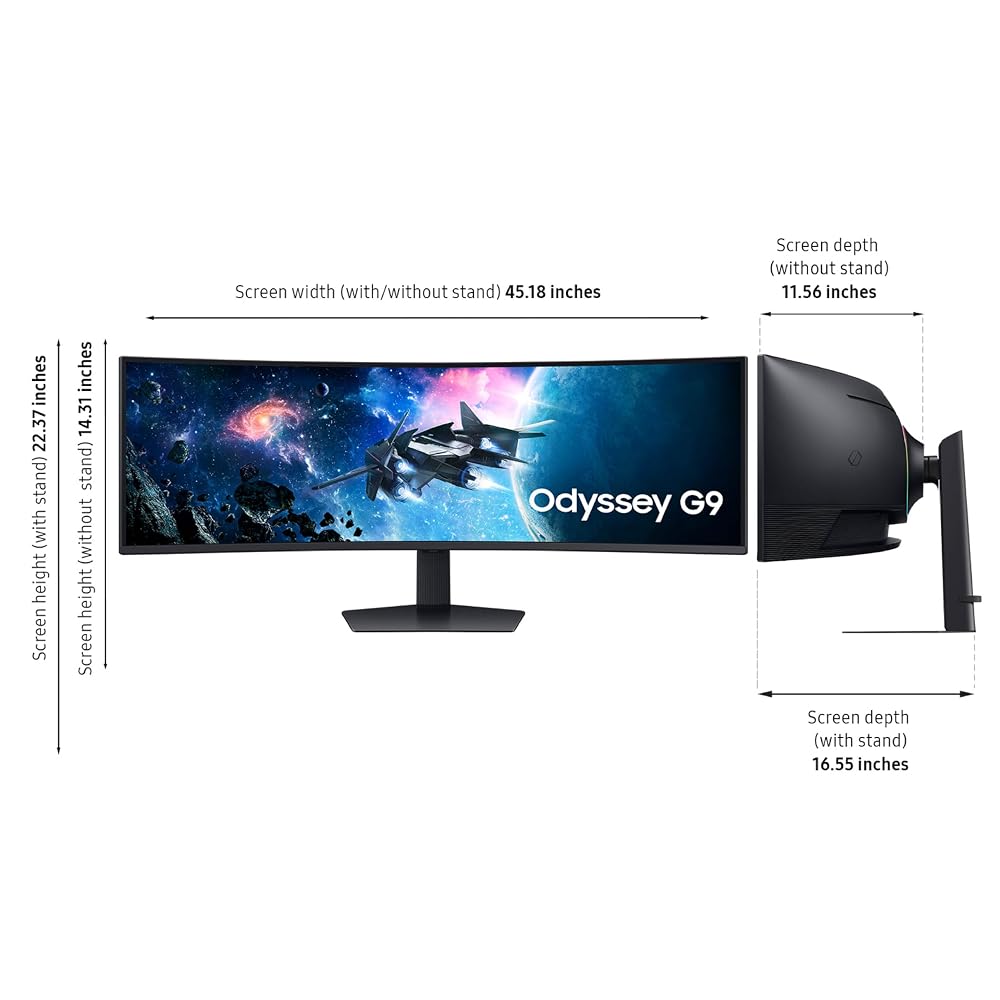
- Measuring 45.2 inches wide, 22.4 inches high, and taking up 16.6 inches of depth with its included Hexa stand, this monitor commands an enormous desktop footprint. Before You Buy
- Deciding between the Samsung Odyssey G9 and smaller alternatives comes down to your space constraints and workflow scale. How It Compares With Similar Picks
- For digital nomads and traveling videographers who spend weeks working from confined laptop screens, coming back to a stationary 49-inch Dual QHD workstation… Bottom Line
One line lifted from each section below — follow the link to read that section in full.
As Amazon Associates, we earn from qualifying purchases. This means we may receive a small commission at no extra cost to you if you click through and make a purchase.
Mobile creators, traveling video editors, and digital nomads frequently build their gear kits around ultraportable laptops, compact GaN chargers, and lightweight external displays to remain nimble while working from transit hubs, client locations, and hotel rooms. However, working on a compact 14-inch or 16-inch laptop screen quickly becomes a serious bottleneck when returning from the field to tackle intricate multi-cam edits, long video sequences, audio mixing, and precision color correction. The Samsung Odyssey G9 is engineered to eliminate those constraints by functioning as a high-performance stationary anchor for creators who need an expansive, continuous workspace when working from their primary home base.
While this monitor makes zero compromises to fit into a carry-on bag, its role in an on-the-go creative workflow is clear: it serves as the ultimate desktop command post where your travel laptop docks to unlock massive visual real estate. In this review, we examine whether this curved ultrawide desktop centerpiece delivers the performance, color depth, and ergonomic versatility needed to anchor a mobile editor’s primary studio desk.
Quick Verdict
The Samsung Odyssey G9 is an uncompromising stationary display engineered for creators who demand maximum visual real estate without the clutter and bezel seams of multiple individual screens. Combining a panoramic 49-inch Dual QHD panel, a pronounced 1000R curvature, and exceptional 240Hz responsiveness, it transforms complex post-production timelines into an effortless, fluid editing environment.
- Sprawling 49-inch 32:9 curved panel delivers the equivalent screen area of two seamless 27-inch displays.
- Crisp 5120×1440 Dual QHD resolution provides ample room for full video timelines, scopes, and project bins.
- Hyper-fast 240Hz refresh rate and 1ms GtG response time ensure stutter-free scrubbing and fluid motion playback.
- Flexible Picture-by-Picture and Picture-in-Picture modes allow dual-machine workflows from a single screen.
Samsung Odyssey G9 Features Explained
Panoramic 49-Inch Screen and 1000R Curve
The defining physical characteristic of the display is its sheer scale and deliberate geometry. With an expansive 49-inch diagonal viewing area and an ultrawide 32:9 aspect ratio, the samsung odyssey g9 curve is engineered with a deep 1000R curvature that matches the natural human field of vision. When seated at your editing desk, the outer edges of the display wrap inward, keeping every section of your visual workspace equidistant from your eyes and reducing the need to constantly shift your posture or strain your neck during long editing sessions.
Beneath that curve sits a sharp Dual QHD resolution of 5120×1440 pixels. In practical workspace terms, this means the samsung g9 dual qhd setup provides the exact digital pixel space of two side-by-side 27-inch 1440p displays, but completely eliminates the plastic central bezel that disrupts traditional dual-monitor configurations. Creators comparing the samsung g9 vs dual monitors will immediately notice how much easier it is to position utility palettes, grading panels, and auxiliary monitors across one unbroken horizontal plane, offering an experience distinct from standard flat panels or even the premium odyssey oled g9 display.
Timeline Expansion and Video Editing Workflow
Evaluating the samsung g9 for video editing reveals substantial efficiency advantages for timeline-heavy applications such as Premiere Pro, DaVinci Resolve, and Final Cut Pro. The 32:9 aspect ratio allows you to stretch an entire project timeline across the bottom half of the screen without having to constantly zoom in and out or scrub horizontally across clips. This frees up the entire upper half of the display for your primary program monitor, scopes, source viewers, media bins, and sound mixing tracks.
To further enhance everyday samsung g9 productivity, the monitor includes built-in Picture-by-Picture (PBP) and Picture-in-Picture (PIP) processing. PBP enables you to connect two separate input devices—such as your mobile editing laptop and a dedicated rendering desktop—and view both sources simultaneously at their native resolutions side by side. For creators who stream their process or reference tutorials while grading footage, PIP allows you to scale a secondary video source up to 25% of the screen area without obstructing your primary software interface. Additionally, Auto Source Switch+ automatically recognizes newly powered inputs, eliminating manual input switching when docking your laptop.
Hyper-Fast Refresh Rates and Motion Clarity
While ultrawide productivity displays often settle for standard 60Hz or 100Hz refresh intervals, the samsung g9 refresh rate reaches an astonishing 240Hz, paired with a rapid 1ms (GtG) response time. When playing back high-frame-rate 120fps slow-motion footage or scrubbing rapidly through unrendered video timelines, the display renders each frame with extreme smoothness and minimal motion blur. The inclusion of AMD FreeSync Premium Pro guarantees that rapid pan movements, fast timeline tracking, and dynamic playback sequences remain completely free of screen tearing and visual stutter.

Visual depth and dynamic range are reinforced through VESA DisplayHDR 1000 certification, delivering a peak brightness of 1000 nits alongside a 1,000,000:1 contrast ratio. The VA panel technology achieves deep blacks and vibrant highlights across its 92 color gamut rating, which is invaluable when assessing contrast levels in high-dynamic-range footage. Whether working on dimly lit cinematic scenes or bright daylight exteriors, the panel preserves shadow details and specular highlights with pronounced precision.
Ergonomic Hexa Stand and Integrated Eye Comfort
Anchoring a display of this size requires thoughtful ergonomics. The Samsung Odyssey G9 includes a robust Hexa stand that provides height adjustment, tilt, and swivel capabilities, allowing you to align the screen precisely to your line of sight. For creators working on custom desk configurations, the chassis is fully compatible with standard VESA monitor arms, enabling you to mount the ultrawide panel off your desk surface to reclaim valuable work area. CoreSync technology and Core Lighting+ project on-screen colors onto the wall behind the monitor, creating ambient backlighting that softens high-contrast transitions.
Long hours spent cutting footage can easily lead to visual fatigue, especially when transitioning between bright daytime studio light and dark evening editing rooms. The display addresses this through TÜV-certified eye comfort technology that minimizes blue light emissions and suppresses screen flicker. Furthermore, the onboard Adaptive Picture system uses an ambient light sensor to continuously analyze room illumination, automatically tuning panel brightness to maintain optimal legibility without requiring manual adjustments. While traveling editors might rely on an ultra-compact screen like a moving style samsung display on the road, having this level of ergonomic and visual customization at home ensures maximum physical comfort during grueling post-production marathons.
Specs
| Screen Size | 49 Inches |
|---|---|
| Resolution | Dual QHD (5120×1440 Pixels) |
| Aspect Ratio | 32:9 |
| Curvature | 1000R |
| Panel Technology | VA LCD |
| Refresh Rate | 240Hz |
| Response Time | 1ms (GtG) |
| Peak Brightness | 1000 cd (VESA DisplayHDR 1000) |
| Contrast Ratio | 1,000,000:1 |
| Color Gamut | 92 |
| Viewing Angle | 178 Degrees |
| Item Dimensions | 16.6"D x 45.2"W x 22.4"H |
| Item Weight | 34.4 Pounds |
| Power Consumption | 120 Watts |
Full spec sheet from the listing (40 entries)
| 0 | Aspect Ratio, 32:9 |
|---|---|
| 1 | Screen Finish, Curved |
| 2 | Contrast Ratio, 1,000,000:1 |
| 3 | Refresh Rate, 240 hertz |
| 4 | Display Type, LCD |
| 5 | Display Technology, VA |
| 6 | Viewing Angle, 178 degrees |
| 7 | Brightness, 1000 cd |
| 8 | Pixel Pitch, 0.23 |
| 9 | Color Gamut, 92 |
| 10 | Picture Quality Enhancement Technology, VESA DisplayHDR 1000 |
| 11 | Screen Size, 49 inches |
| 12 | Item Dimensions D x W x H, 16.6"D x 45.2"W x 22.4"H |
| 13 | Item Weight, 34.4 pounds |
| 14 | Resolution, DQHD |
| 15 | Display Resolution Maximum, 5120×1440 pixels |
| 16 | Native Resolution, 5120×1440 |
| 17 | Power Consumption, 120 watts |
| 18 | Voltage, 110 volts |
| 19 | Total Number of HDMI Ports, 2 |
| 20 | Total Usb Ports, 2 |
| 21 | Number of Component Outputs, 1 |
| 22 | Total USB 2.0 Ports, 2 |
| 23 | Total USB 3.0 Ports, 2 |
| 25 | Specific Uses For Product, Gaming |
| 26 | Color, Black |
| 27 | Mounting Type, Wall Mount |
| 28 | Compatible Devices, Devices with HDMI, DisplayPort, USB, and FreeSync Premium Pro support |
| 29 | Warranty Type, 1 Year Manufacturer Warranty |
| 30 | Shape, Curved |
| 31 | Brand, Samsung |
| 32 | Model Number, FBASAMLS49CG954E |
| 33 | Model Name, FBASAMLS49CG954E |
| 34 | Warranty Description, 1 year manufacturer |
| 35 | UPC, 887276792156 |
| 36 | Manufacturer, Samsung |
| 37 | Unit Count, 1 Count |
| 38 | Best Sellers Rank, #8,022 in Electronics (See Top 100 in Electronics) #295 in Computer Monitors |
| 39 | ASIN, B0CP6HW894 |
| 40 | Response Time, 1 milliseconds |
Quoted from the product listing, not measured by us.
Samsung Odyssey G9 Pros and Cons
Pros
- Massive 49-inch Dual QHD ultrawide workspace
- Immersive 1000R curvature wraps around vision
- Fluid 240Hz refresh rate and 1ms response
- Bright VESA DisplayHDR 1000 with 1000 nits
- Ergonomic stand with height tilt and swivel
Cons
- Heavy 34.4-pound weight restricts portability
- Deep 16.6-inch base demands significant desk space
- High 120-watt continuous power consumption
Check Samsung Odyssey G9 on Amazon
Best Use Cases
- Video editors needing an expansive, continuous 32:9 timeline to arrange complex multi-camera edits and color grading scopes side by side.
- Mobile professionals docking their travel laptops to a stationary hub that provides the equivalent productivity of two separate 27-inch monitors.
- Digital creators using Picture-by-Picture to simultaneously monitor two individual computer inputs on a single panoramic surface.
- Content producers who require high visual fluidity with a 240Hz refresh rate and AMD FreeSync Premium Pro during fast media playback and motion tracking.
Before You Buy
Before committing to this massive monitor, carefully evaluate your physical setup and samsung g9 desk space requirements. Measuring 45.2 inches wide, 22.4 inches high, and taking up 16.6 inches of depth with its included Hexa stand, this monitor commands an enormous desktop footprint. With a total weight of 34.4 pounds, it demands a solid, heavy-duty desk capable of handling substantial weight and depth without wobbling. Creators with shallow desks or limited office layouts might find the deep 1000R curve brings the screen uncomfortably close to their face. In smaller workspaces, more conventional desktop monitors such as a 32 inch smart monitor m8 m80f or a samsung g5 odyssey 27 inch occupy substantially less physical area while remaining easier to position.
Hardware driving capabilities must also be considered before purchase. Operating a 5120×1440 resolution at 240Hz requires modern display interfaces and a powerful graphics card capable of pushing that pixel throughput. The monitor consumes 120 watts of power during operation and utilizes VA LCD panel technology with a 0.23 pixel pitch. However, the manufacturer listing does not specify the exact quantities of HDMI or DisplayPort connections, nor does it detail which specific display cables are included in the box. Furthermore, the listing does not specify built-in speaker wattage, so editors relying on precise audio feedback should plan to use external studio monitors or headphones.
How It Compares With Similar Picks
| Product | Best For | Key Difference |
|---|---|---|
| Samsung Odyssey G9 | Stationary timeline editing and dual-source workflows | 49-inch 1000R curved Dual QHD VA screen with 240Hz refresh rate and 1000 nit peak brightness. |
| Sceptre New 22-Inch Gaming Monitor | Compact setups and portable travel desks | 22-inch flat 1080p display with up to 144Hz refresh rate, DisplayPort, HDMI, and built-in speakers. |
| 1ms | Everyday office tasks and standard editing duties | 27-inch flat 1080p IPS display with 120Hz refresh rate, 99% sRGB color, AdaptiveSync, and bluelight filter. |
| SANSUI 27 Inch Curved 240Hz | Budget curved setups requiring fast motion clarity | 27-inch 1500R curved 1080p screen with 240Hz refresh rate, 130% sRGB, 4000:1 contrast, and metal stand. |
Deciding between the Samsung Odyssey G9 and smaller alternatives comes down to your space constraints and workflow scale. If your creative process revolves around editing long multi-track videos, managing complex multi-window spreadsheets, or operating two machines simultaneously, the 49-inch curved ultrawide form factor is unmatched in speed and comfort. Conversely, if you reside in temporary housing, work from modest shared desks, or prioritize ease of relocation, standard 22-inch and 27-inch 1080p monitors provide reliable visual fidelity without requiring specialized heavy-duty desk reinforcement or vast horizontal desk clearance.
Bottom Line
When determining whether the samsung g9 is worth it for a mobile editor’s primary workstation, the answer depends entirely on your need for an uncompromising home base. For digital nomads and traveling videographers who spend weeks working from confined laptop screens, coming back to a stationary 49-inch Dual QHD workstation provides a massive boost in editing efficiency and posture comfort. It turns post-production into a streamlined, cinematic experience where every clip, audio meter, and tool palette sits in direct view.
While its 34.4-pound weight, 120-watt power consumption, and substantial 16.6-inch depth render it entirely stationary, its 240Hz refresh rate, 1000 nit peak brightness, and bezel-free workspace justify the dedicated desk real estate. If you have the sturdy desk space to accommodate its footprint, the Samsung Odyssey G9 stands as one of the most capable post-production anchors available.
FAQ
Can you connect two computers to the Samsung Odyssey G9 at the same time?
Yes. The display includes Picture-by-Picture (PBP) capability, which allows you to display inputs from two separate computers simultaneously at their native resolution across the 32:9 screen. It also features Picture-in-Picture (PIP), which lets you resize a secondary input window up to 25% of the total display area.
What are the primary Samsung G9 monitor specs for creative work?
Key specifications include a 49-inch VA LCD curved screen with a 1000R curvature, 5120×1440 Dual QHD resolution, a 32:9 aspect ratio, a 240Hz refresh rate, a 1ms GtG response time, VESA DisplayHDR 1000 with 1000 nit peak brightness, a 1,000,000:1 contrast ratio, and a 92 color gamut rating.
Does the Samsung Odyssey G9 include built-in speakers?
The manufacturer listing does not specify integrated speakers on this model. Mobile editors and multimedia producers should connect dedicated external studio monitors, desktop speakers, or high-end headphones to handle professional audio mixing.
How does the 1000R curve improve productivity compared to flat displays?
The 1000R curve matches the natural curvature of the human eye’s field of view. On an ultrawide 49-inch screen, this curvature pulls the outer edges inward, allowing you to view timelines and auxiliary windows in your peripheral vision without straining your neck or shifting your seating position.
Can you mount the Samsung Odyssey G9 on a monitor arm?
Yes. While the screen comes with a height, swivel, and tilt adjustable Hexa stand, it also supports standard VESA monitor arms. Given the display’s 34.4-pound overall weight and wide center of gravity, users must ensure any aftermarket monitor arm is rated to support heavy ultrawide panels.
How this site works
- 1,839reviews published
- 2,323products with a score
- 2,260products with listed features
- 84brands covered
Prices, stock and specifications are read from the Amazon product listing. We do not run lab tests of our own; scores are out of 10, based on listed specifications and buyer feedback, not a verdict from a test bench. We track one retailer, so prices here are not a comparison.


