Satechi 7-in-1 Pro Slim Hub: The Ultimate Cable-Free Travel Adapter?
Traveling videographers, photographers, and mobile professionals frequently encounter the frustrating physical limitations of modern ultra-thin laptops. When you work from cramped airline tray tables, coffee shop counters, or temporary shared desks, carrying a tangle of dongles with loose cables creates unnecessary clutter and friction. The Satechi Pro Slim Hub addresses this dilemma by offering a…
10 min read


Reviewed
Satechi Pro Slim Hub
Buyer rating
Liked
The listing does not publish how many buyers rated it.
Price today
| Amazon | Not listed | View deal |
|---|
- Prime eligible
- Sold by Satechi, shipped by Amazon
We track one retailer, so this is not a price comparison. Affiliate link; price and stock come from the listing and change without notice.
What you need to know
- Measuring 4.92 inches long, 1.18 inches wide, and just 0.31 inches thick, it maintains a razor-thin footprint that matches the sleek profile of modern… Satechi Pro Slim Hub Features Explained
- Ingesting high-resolution photo and video footage from camera SD cards to high-speed external drives in airport terminals or production vans. Best Use Cases
- If your machine is enclosed in a heavy protective case that cannot be easily removed during edits, a tethered dongle such as the satechi multiport pro adapter v2… Before You Buy
- For general multi-device connectivity where you want an intermediary cord and guaranteed 4K@60Hz video output, the 85W Max PD provides reliable performance. How It Compares With Similar Picks
- The inclusion of 40Gbps USB4 transfer speeds, dual 10Gbps USB-A ports, and full 100W charging pass-through ensures that you rarely have to compromise on data… Bottom Line
One line lifted from each section below — follow the link to read that section in full.
As Amazon Associates, we earn from qualifying purchases. This means we may receive a small commission at no extra cost to you if you click through and make a purchase.
Traveling videographers, photographers, and mobile professionals frequently encounter the frustrating physical limitations of modern ultra-thin laptops. When you work from cramped airline tray tables, coffee shop counters, or temporary shared desks, carrying a tangle of dongles with loose cables creates unnecessary clutter and friction. The Satechi Pro Slim Hub addresses this dilemma by offering a streamlined, direct-attach expansion solution tailored specifically for users who need comprehensive desktop connectivity without carrying a heavy, cable-heavy accessory pouch. By plugging directly into the host machine without an intermediary cord, this compact adapter creates a neat, unified physical profile that turns any flat surface into a functional mobile editing workstation.
For creators on the move, finding an adapter that balances port diversity, high-speed file transfer capabilities, and strong pass-through charging is essential. This seven-in-one expansion tool combines a 40Gbps USB4 connection, dual 10Gbps USB-A ports, a dedicated USB-C data channel, an SD card reader, and 4K HDMI video output inside an ultra-light 41-gram aluminum housing. While its direct-mount design and strict 40°C safety cutoff impose specific physical and environmental considerations, it stands out as a highly capable tool for travel-focused content creation kits.
Quick Verdict
The Satechi Pro Slim Hub is an exceptionally portable, high-efficiency expansion adapter built for minimalist travel kits and mobile creative workflows. Weighing only 41 grams and measuring barely 0.31 inches thick, it delivers premium multi-port flexibility—including 40Gbps USB4 speeds and 100W charging pass-through—without introducing cable clutter to your desk. While users operating in high-temperature environments must account for its automatic 40°C thermal protection shutoff, it represents an outstanding blend of speed and portability for on-the-go professionals.
- Direct flush-mount aluminum design eliminates dangling cables and keeps mobile workspaces tidy
- Equipped with high-bandwidth 40Gbps USB4 alongside dual 10Gbps USB 3.2 Gen 2 ports
- Passes through up to 100W of power while handling 4K HDMI video and flash memory cards
- Lightweight 41-gram metal construction incorporates an automatic safety shutoff mechanism at 40°C
Satechi Pro Slim Hub Features Explained
Direct Cableless Mount and Aluminum Construction
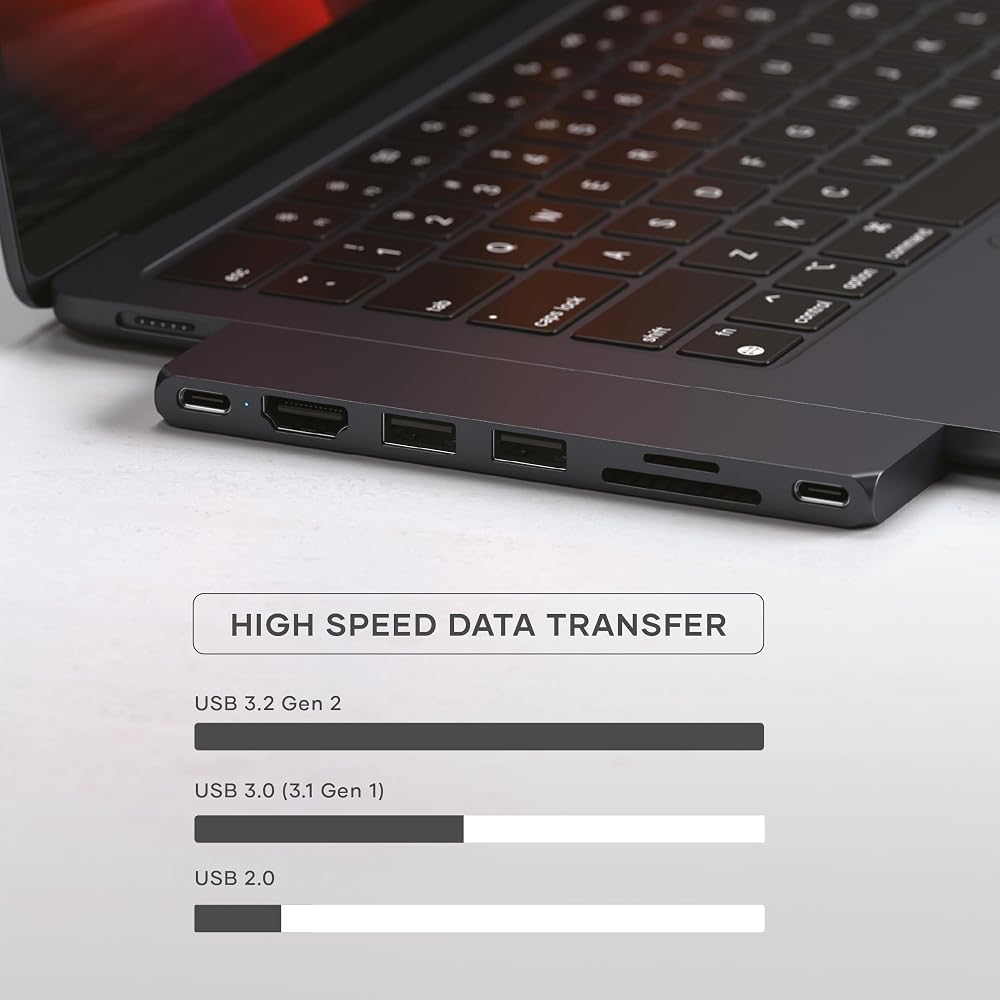
One of the most defining aspects of this multi-port adapter is its rigid, direct-plug design. Unlike conventional dongles that dangle from a flexible pigtail cord, this cableless macbook usb-c hub plugs directly into the host machine’s USB-C port, resting flush against the laptop chassis. Measuring 4.92 inches long, 1.18 inches wide, and just 0.31 inches thick, it maintains a razor-thin footprint that matches the sleek profile of modern ultra-portable computers. The exterior enclosure is crafted from metal aluminum finished in Midnight, which provides structural rigidity against drops and everyday bag compression.
Because the unit locks directly to the side of the computer, there are no flexible rubber cords to fray, twist, or snap over months of transit. This clean, rigid connection allows you to pick up your laptop and move across a studio or terminal without an external dongle slapping against the chassis. While heavy multi-port desktop solutions such as the caldigit ts5 plus thunderbolt 5 dock are designed for stationary workstations with dedicated mains power, this portable adapter prioritizes extreme packability by shaving total carry weight down to just 41 grams.
High-Bandwidth 40Gbps USB4 and USB 3.2 Data Ports
Modern video workflows generate immense file sizes, and high transfer bandwidth is crucial when working away from the studio. This adapter features a maximum data transfer rate of 40 gigabits per second powered by its USB4 interface. That throughput makes the satechi pro slim video editing experience snappy and responsive, enabling editors to ingest high-bitrate video clips, scrub multi-camera timelines, and back up RAW footage to external solid-state storage without crippling performance slowdowns.
In addition to its primary high-speed bus, the device features four total USB ports. Among these are two USB 3.2 Gen 2 ports rated for 10Gbps speeds, alongside an additional USB-C data port. Having 10Gbps transfer capability across both USB-A ports ensures that legacy external drives, thumb drives, and audio interfaces can operate at peak efficiency. This port arrangement prevents the frustrating bandwidth choke common in standard 5Gbps splitters, giving mobile editors plenty of overhead for high-resolution project files.
Power Delivery and 100W Charging Pass-Through
Keeping a power-hungry laptop charged during intensive exports or color grading sessions can quickly monopolize available ports. The satechi pro slim 100w pass through capability solves this by routing up to 100W of charging power directly through the hub to the host computer. Users can plug their standard USB-C laptop charger into the hub’s dedicated power delivery port, replenishing the machine’s battery while simultaneously running peripherals and external displays from the remaining slots.
This single-port power management is particularly advantageous on laptops with limited physical connections. Instead of burning one port on power and another on an adapter, the hub consolidates electricity routing and data exchange into a single interface. For mobile professionals who prefer versatile, stand-mounted travel arrangements, comparing this direct dock to solutions like the satechi onthego foldable stand hub illustrates how direct-mount adapters maximize desk space by eliminating intermediate cables entirely.
Integrated SD Card Reader and 4K HDMI Output
Field production demands reliable ingestion from physical camera media, and the satechi usb4 slim hub sd card reader provides direct offloading for photography and video shoots. Rather than hunting for standalone card dongles in your bag, you can pop your memory card directly into the adapter to begin transferring footage. The listing also highlights an SD/Micro card reader configuration, making it straightforward to pull media from cameras, aerial drones, and action capture devices directly onto your machine.
When presenting edits to clients or connecting to an external display in a hotel room or workspace, the built-in HDMI hardware interface outputs clean 4K video. Having a dedicated 4K HDMI port on a hub this slim allows creators to drive high-resolution monitors without carrying specialized video conversion cables. This setup bridges the gap between field mobility and desktop monitoring, ensuring you can review color, focus, and timeline pacing on a larger screen whenever one is available.
Thermal Management and Automatic Safety Protection
Packing high-speed data buses and 100W charging circuitry into a 41-gram aluminum enclosure generates heat during heavy file operations. The metal aluminum casing functions as a passive heat spreader, actively pulling thermal energy away from the internal controllers and transferring it into the ambient air. Through this satechi pro slim heat dissipation architecture, the adapter maintains operational efficiency under regular everyday productivity and media transfers without requiring a noisy internal fan.
To safeguard connected hardware, the manufacturer built in an active safety mechanism. The adapter monitors operating temperatures and electrical parameters, automatically shutting off if the internal temperature exceeds 40°C (104°F) or if abnormal current or voltage spikes are detected. This emergency cutoff protects both the hub and your host computer against thermal degradation or electrical faults, providing valuable reassurance when routing high-wattage power in warmer field environments.
Specs
| Brand | Satechi |
|---|---|
| Hardware Interface | HDMI |
| Total USB Ports | 4 |
| Total Number of Ports | 7 |
| Data Transfer Rate | Up to 40 Gbps (USB4) / 10 Gbps (USB 3.2 Gen 2) |
| Power Delivery Pass-Through | Up to 100W |
| Enclosure Material | Metal Aluminum |
| Color | Midnight |
| Item Dimensions | 4.92"L x 1.18"W x 0.31"H |
| Item Weight | 41 g |
| Operating System Requirements | Mac OS 13 Ventura minimum, Windows 10, Windows 8, Linux, Google Play |
| Safety Cutoff | Automatic shutoff above 40°C (104°F) or high current/voltage |
Full spec sheet from the listing (26 entries)
| 0 | Hardware Interface, HDMI |
|---|---|
| 1 | Additional Features, Plug and Play |
| 3 | Total Usb Ports, 4 |
| 4 | Data Transfer Rate, 40 gigabits_per_second |
| 5 | Number of Ports, 7 |
| 6 | Minimum Required Operating System Version, Mac OS 13 Ventura |
| 7 | Operating System, Google Play, Linux, Windows 10, Windows 8 |
| 8 | Color, Midnight |
| 9 | Enclosure Material, Metal Aluminum |
| 10 | EU Spare Part Availability Duration, 1 years |
| 11 | Item Dimensions L x W x H, 4.92"L x 1.18"W x 0.31"H |
| 12 | Item Weight, 41 g |
| 13 | Brand, Satechi |
| 14 | Number of Packs, 1 |
| 15 | Item Highlight, USB hub, 100W Charging, USB 4, USB 3.2 Gen 2, SD/Micro Card Reader, for Mac, MacBook Air/Pro |
| 16 | Manufacturer, Satechi |
| 17 | UPC, 810086360628 |
| 18 | Number of Items, 1 |
| 19 | Unit Count, 1 count |
| 20 | Built-In Media, Item |
| 21 | Model Number, ST-HUCPHSD |
| 22 | Mfr Part Number, ST-HUCPHSD |
| 23 | Warranty Description, 2-year limited warranty |
| 24 | Best Sellers Rank, #1,927 in Computers & Accessories (See Top 100 in Computers & Accessories) #184 in Laptop Docking Stations |
| 25 | ASIN, B0BV4BVSGR |
| 26 | Special Feature, Plug and Play |
Quoted from the product listing, not measured by us.
Satechi Pro Slim Hub Pros and Cons
Pros
- Ultralight 41-gram aluminum enclosure for travel
- Up to 100W charging pass-through support
- Fast 40Gbps data transfer rate with USB4
- Direct plug-in cable-free design for MacBook
- Dual 10Gbps USB 3.2 Gen 2 ports
Cons
- Requires Mac OS 13 Ventura or newer
- Automatic thermal shutoff activates at 40°C
- Direct mount blocks adjacent ports with cases
- External charger not included in the package
Check Satechi Pro Slim Hub on Amazon
Best Use Cases
- Ingesting high-resolution photo and video footage from camera SD cards to high-speed external drives in airport terminals or production vans.
- Maintaining an ultra-clean, cable-free editing footprint on crowded coffee shop counters and small shared studio desks.
- Driving a 4K HDMI client monitor while routing 100W pass-through power to your laptop during remote color grading reviews.
- Packing an emergency multi-port expansion toolkit into an ultra-thin laptop sleeve without adding noticeable bulk or weight.
Before You Buy
Before purchasing this adapter, it is essential to verify physical compatibility with your specific laptop setup. The satechi 7-in-1 pro slim hub for macbook is built specifically for MacBook Air and MacBook Pro models with USB-C ports, and it specifies a minimum operating system version of Mac OS 13 Ventura (with additional support listed for Windows 10, Windows 8, Linux, and Google Play). Because this adapter plugs directly into the laptop chassis without an extension cord, protective hardshell cases, thick snap-on covers, or port bumpers will likely prevent the connector from seating flush against the computer. If your machine is enclosed in a heavy protective case that cannot be easily removed during edits, a tethered dongle such as the satechi multiport pro adapter v2 may provide a more practical physical connection.
It is also important to note what comes in the retail package and what the listing leaves out. The product ships as a single-pack aluminum adapter (UPC 810086360628) and does not include an external AC wall charger, USB-C charging cord, or HDMI cable. To achieve 100W pass-through charging, you must connect your own high-wattage USB-C power supply. Additionally, while the listing highlights an SD/Micro card reader configuration alongside 4K HDMI video, it does not specify whether both card formats can be read simultaneously, nor does it specify the maximum refresh rate for the 4K HDMI output. Users planning high-frame-rate external monitor workflows should keep these listing omissions in mind.
How It Compares With Similar Picks
| Product | Best For | Key Difference |
|---|---|---|
| Satechi Pro Slim Hub | Mobile video editors needing high-speed USB4 and direct flush mounting | 40Gbps USB4 transfer rate, 100W charging pass-through, and 41-gram cable-free aluminum design |
| 5Gbps Data Transfer for Mouse | Budget desktop users expanding basic low-bandwidth accessories | Tethered 0.5-foot cable with 4 USB-A ports limited to 5Gbps without charging or video out |
| USB 3.0 Hub with 3.3ft | Stationary desk setups requiring manual device power management | Desktop-bound design with 3.3-foot cable, 7 USB-A ports, and individual mechanical toggle switches |
| 85W Max PD | Users requiring flexible cable tethering and verified 4K@60Hz video | Tethered cable construction supporting 85W pass-through charging and 4K@60Hz HDMI output |
Selecting between these options comes down to your physical workstation layout and data throughput requirements. If you operate at a permanent desk where multiple low-speed accessories need to stay plugged in, a tethered cord model like the USB 3.0 Hub with 3.3ft or the 5Gbps Data Transfer for Mouse offers extended reach and physical clearance. For general multi-device connectivity where you want an intermediary cord and guaranteed 4K@60Hz video output, the 85W Max PD provides reliable performance. However, if your goal is to eliminate loose cords completely while traveling and you require blazing 40Gbps transfer bandwidth with 100W power delivery, the Satechi adapter stands out as the most cohesive mobile choice.

Bottom Line
Deciding whether the satechi 7-in-1 pro slim hub is worth it comes down to how heavily you value packing light and eliminating cord clutter. For traveling digital creatives, photographers, and mobile editors, the adapter solves the biggest headache of modern portable laptops by delivering comprehensive connectivity in a featherweight 41-gram package. The inclusion of 40Gbps USB4 transfer speeds, dual 10Gbps USB-A ports, and full 100W charging pass-through ensures that you rarely have to compromise on data bandwidth or battery replenishment while working remotely.
On the other hand, the rigid direct-plug design requires a bare laptop edge without thick cases, and the built-in 40°C thermal protection cutoff means you must be mindful of operating temperatures during intense exports in warm climates. As long as those design boundaries align with your mobile routine, this sleek Midnight aluminum satechi pro slim travel dock provides an exceptional balance of speed, physical elegance, and portability for creators who refuse to let dongles clutter their journey.
FAQ
What are the data transfer speeds on this hub?
The adapter supports a maximum data transfer rate of up to 40Gbps across its primary USB4 interface. In addition, it features two USB 3.2 Gen 2 ports capable of 10Gbps transfer speeds, along with a dedicated USB-C data channel for connecting external drives, card readers, and other high-speed peripherals.
Does the adapter require special software or drivers to work?
No, the hub features a plug-and-play architecture that does not require proprietary drivers, control software, or manual setup utilities. Once plugged directly into a compatible host machine running Mac OS 13 Ventura or compatible Windows, Linux, or Google Play operating systems, all ports and interfaces activate immediately.
How does the automatic thermal protection shutoff function?
The adapter is engineered with an internal device safety mechanism that continuously monitors internal temperature and electrical current. If the unit exceeds 40°C (104°F) or encounters high current or voltage surges, it automatically powers off to protect internal silicon and safeguard the host laptop from electrical or heat damage.
Can I charge my laptop while transferring files and using the HDMI port?
Yes, the hub supports power delivery pass-through of up to 100W. By connecting your USB-C power brick directly to the hub’s charging port, you can route electricity to your laptop battery while concurrently offloading media, accessing USB-A drives, and outputting video to an external 4K display.
Will this hub fit if my laptop is inside a hard snap-on shell?
Because the adapter attaches directly and sits flush against the laptop chassis without an extension cable, protective snap-on plastic cases or thick edge covers will generally prevent the USB-C plug from inserting fully. For the most secure and reliable physical connection, the laptop side edge should remain free of thick cases.
How this site works
- 194reviews published
- 2,323products with a buyer rating
- 2,260products with listed features
- 84brands covered
Ratings, prices, stock and specifications are read from the Amazon product listing. We do not run lab tests of our own, so a score here is the average rating left by buyers, not a verdict from a test bench. We track one retailer, so prices here are not a comparison.



