BenQ ScreenBar Halo Review: Precision Lighting for Mobile Workspaces
Remote digital creators, traveling video editors, and mobile professionals frequently work across irregular environments, from dim hotel desks to cramped temporary workstations where poor ambient lighting wrecks visual concentration. When editing high-resolution footage or executing precise color corrections, overhead ceiling lights and unshaded desk lamps create harsh reflections across display glass that obscure dark shadows…
9 min read




Reviewed
BenQ ScreenBar Halo
Buyer rating
Very well liked
The listing does not publish how many buyers rated it.
Price today
| Amazon | Not listed | View deal |
|---|
- Prime eligible
- Sold by BenQ INFTY Lab, shipped by Amazon
We track one retailer, so this is not a price comparison. Affiliate link; price and stock come from the listing and change without notice.
What you need to know
- The BenQ ScreenBar Halo counters this through proprietary ASYM-Light optical technology, which directs illumination downward and forward at an 18-degree anti-glare… BenQ ScreenBar Halo Features Explained
- Cramped temporary desks in hotel rooms or shared workspaces where physical desktop real estate must be preserved for editing gear. Best Use Cases
- The clamp supports panels between 0.17 and 2.36 inches thick and accommodates 1000R to 1800R curves, but it is explicitly designed for desktop displays rather than… Before You Buy
- Editors working on compact 13-inch to 15-inch portable displays or severely restricted tabletops might opt for the smaller footprint of the 11.8-inch Monitor Light… How It Compares With Similar Picks
- By uniting an 18-degree asymmetrical front beam with an adjustable ambient backlight, it resolves the dual challenges of display glare and high room contrast that… Bottom Line
One line lifted from each section below — follow the link to read that section in full.
As Amazon Associates, we earn from qualifying purchases. This means we may receive a small commission at no extra cost to you if you click through and make a purchase.
Remote digital creators, traveling video editors, and mobile professionals frequently work across irregular environments, from dim hotel desks to cramped temporary workstations where poor ambient lighting wrecks visual concentration. When editing high-resolution footage or executing precise color corrections, overhead ceiling lights and unshaded desk lamps create harsh reflections across display glass that obscure dark shadows and distort color perception. The BenQ ScreenBar Halo solves these workspace friction points by clamping directly onto your external monitor, directing balanced, glare-free task light onto your keyboard and documents without casting reflections onto the screen surface.
For mobile and hybrid creators seeking to determine if this lighting bar fits their travel workflow, the short verdict is that it provides studio-grade desktop illumination and optical comfort whenever you work with a standalone display. While an 800-gram overall weight and 19.7-inch width mean it demands intentional space inside a gear bag compared to ultralight travel accessories, its high color rendering index, dedicated wireless controller, and ambient backlighting make it an exceptional tool for demanding post-production environments.
Quick Verdict
The BenQ ScreenBar Halo is an advanced desktop illumination system designed for visual professionals who need optical precision, zero screen glare, and relaxed eyes during long hours of color grading and screen work.
- Delivers accurate color rendering with a CRI rating above 95 alongside an 18-degree asymmetrical optical cutoff that eliminates monitor reflections.
- Integrates a rear ambient backlight to reduce high-contrast glare between your display panel and dark surrounding rooms.
- Operates smoothly with an intuitive wireless desktop dial featuring real-time numerical readouts, memory recall, and stepless temperature adjustments from 2700K to 6500K.
- Powers via a standard 5-volt direct current USB cable at 5 watts, making it compatible with powered USB hubs, docks, and external monitors.
BenQ ScreenBar Halo Features Explained
Asymmetrical Optical Geometry and Glare Prevention
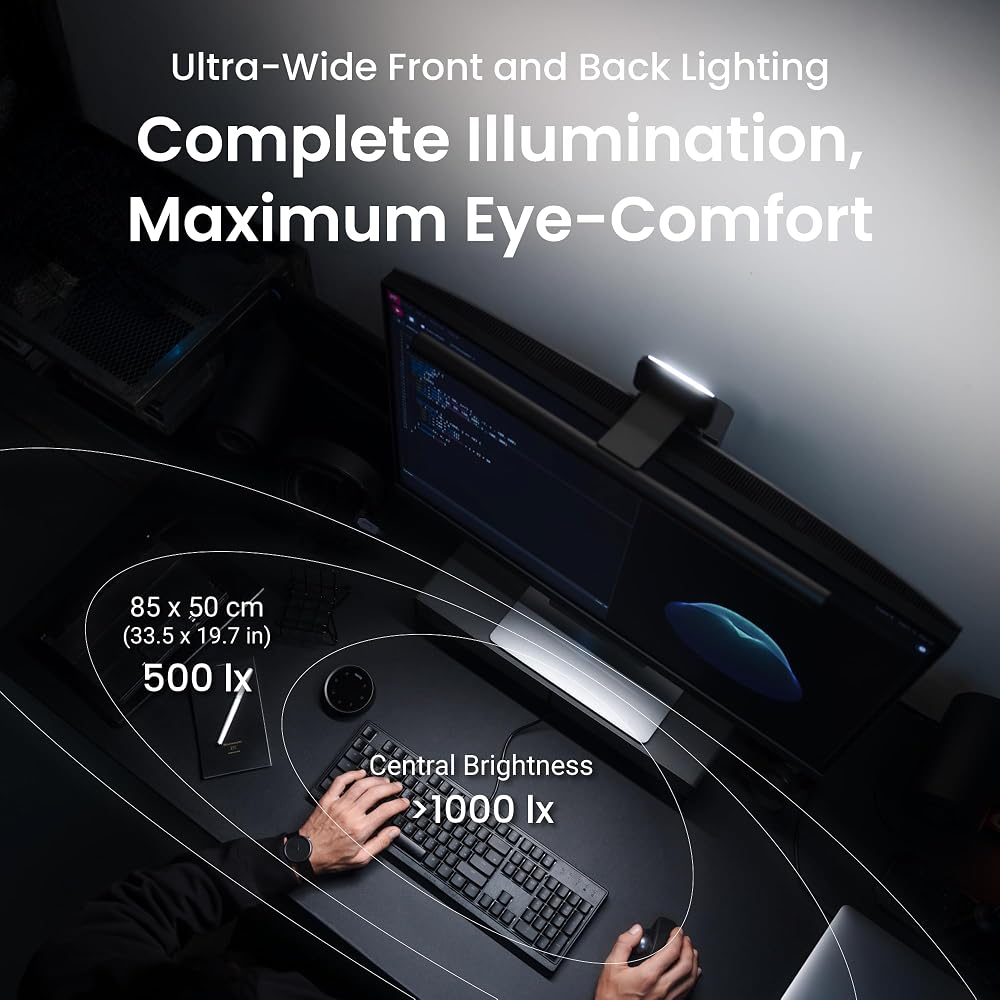
Traditional desk lamps disperse illumination in a conical pattern that inevitably bounces off monitor glass directly into the user’s eyes, causing veiling glare and eye strain. The BenQ ScreenBar Halo counters this through proprietary ASYM-Light optical technology, which directs illumination downward and forward at an 18-degree anti-glare angle. This optical design ensures the light beam covers the desktop workspace completely while maintaining a razor-sharp cutoff along the surface of the screen.
For remote creators who work late into the night, this targeted optical distribution is critical. It allows you to clearly view color grading panels, audio mixers, keyboards, and paper storyboards without washing out monitor blacks or creating bright hotspots. Furthermore, the unit incorporates certified flicker-free and blue-light-hazard-free LED hardware, bolstering long-term visual comfort during grueling project deadlines.
Integrated Ambient Backlight for Visual Comfort
Working in dark or dimly lit hotel rooms creates extreme contrast between a bright monitor panel and the shadowy environment behind it. This severe brightness delta forces your pupils to repeatedly dilate and constrict as your gaze shifts around the workstation, accelerating visual fatigue. The BenQ ScreenBar Halo tackles this problem by incorporating an adjustable ambient rear light designed to softly illuminate the wall behind your monitor.
This rear ambient light diffuses contrast across your peripheral field of view, helping your eyes stay relaxed and focused across extended video cutting sessions. Creators can engage front illumination only, rear illumination only, or both simultaneously. This flexible control over ambient balance ensures you can establish an optimal optical environment regardless of how poorly lit your temporary editing room might be.
Wireless Controller Dial and Custom Settings
Adjusting lighting settings while deep in an editing workflow should not require reaching awkwardly over a monitor to fumble with tiny buttons. The BenQ ScreenBar Halo wireless controller sits conveniently beside your keyboard or editing deck, functioning as an intuitive desktop dial. The touch-sensitive interface features a built-in display that illustrates precise numerical values, enabling repeatable, fine-tuned adjustments to both brightness and color temperature.
The controller provides stepless dimming alongside a broad color temperature span ranging from a warm 2700K to a cool, clinical 6500K. A dedicated “My Favorite” memory setting allows you to lock in preferred working levels and recall them with a single tap. If you switch between different workspaces or paired monitors like a BenQ PD3225U 32-inch 4K monitor, the dial keeps precise illumination adjustments easily within reach without cluttering your physical desk surface with extra cords.
Color Rendering Accuracy for Visual Production
Lighting quality is paramount for creative professionals who manipulate color daily. Many standard LED lamps introduce severe color shifts due to discontinuous spectral output, skewing your perception of physical color swatches and ambient workspace tones. The BenQ ScreenBar Halo utilizes full-spectrum LEDs delivering a color rendering index (CRI) exceeding 95, reproducing ambient tones with lifelike realism.
Crucially for editors and designers, the ScreenBar Halo has been tested to verify that its directional output does not distort screen color or interfere with color calibration workflows. Whether evaluating physical design proofs, grading video footage, or working on detailed photographic retouching, the light provides neutral, dependable illumination that preserves the integrity of your visual workspace.
Mounting Clamp Architecture and Curved Screen Compatibility
Compact desks leave minimal room for bulky traditional lamp bases, which can crowd out essential peripherals like external hard drives, audio interfaces, and drawing tablets. The ScreenBar Halo utilizes a counterweighted desktop clamp engineered to mount securely atop monitors measuring from 0.17 to 2.36 inches (0.43 to 6 centimeters) in thickness. The mounting mechanism grips the monitor frame without placing damaging pressure on the display panel itself.
The clamp is also designed to accommodate curved monitor profiles with curvatures spanning from 1000R to 1800R. Curved displays often present mounting challenges for standard clip lights due to their sweeping geometry, but the specialized clamp design on this unit stabilizes the 19.7-inch light bar cleanly along the curve, ensuring seamless, uniform coverage across wide desk surfaces.
Specs
| Light Source Type | Full-Spectrum LED (>50,000 hours lifespan) |
|---|---|
| Color Rendering Index | CRI > 95 |
| Color Temperature Range | 2700K to 6500K (Stepless adjustment) |
| Power Source & Wattage | USB electrical cable, 5V DC, 5 Watts |
| Switch & Controller Type | Desktop wireless dial, touch interface |
| Monitor Thickness Compatibility | 0.17 to 2.36 inches (0.43 to 6 cm) |
| Curved Monitor Compatibility | 1000R to 1800R curvature |
| Item Dimensions (D x W x H) | 5.6 x 19.7 x 4.3 inches |
| Item Weight | 800 grams |
| Water Resistance | Not waterproof (Is Waterproof: false) |
Full spec sheet from the listing (40 entries)
| 0 | Switch Type, Touch |
|---|---|
| 1 | Additional Features, Adjustable Color Temperature, Dimmable, Full Spectrum, Memory Function, Motion Sensor |
| 2 | Light Source Type, LED |
| 3 | Power Source, Electrical cable (USB) |
| 4 | Number of Light Sources, 1 |
| 5 | Is Waterproof, false |
| 6 | Mounting Type, Desktop |
| 7 | Wattage, 5 watts |
| 8 | Lighting Method, LED |
| 9 | Efficiency, Verimli |
| 10 | Voltage, 5 volts_of_direct_current |
| 11 | Controller Type, Desktop Dial, touch |
| 12 | Finish Types, Polished |
| 13 | Shade Color, Dark Grey |
| 14 | Style Name, Minimalist |
| 15 | Color, Dark Grey |
| 16 | Item Dimensions D x W x H, 5.6"D x 19.7"W x 4.3"H |
| 17 | Item Weight, 800 g |
| 18 | Shade Height, 10.91 centimeters |
| 19 | Lamp Type, Desk Lamp |
| 20 | Brand Name, BenQ |
| 21 | Room Type, Office, Study Room |
| 22 | Recommended Uses For Product, Gaming, Reading, Movie, Work from Home, Home Office, Room Decor, Desk Decor, Aesthetic |
| 23 | Included Components, Adapter, Monitor Light Bar, Remote Control, Webcam Accessory |
| 24 | Number of Items, 1 |
| 25 | Indoor Outdoor Usage, Indoor |
| 26 | Model Number, ScreenBar Halo 2 |
| 27 | Number of Pieces, 1 |
| 28 | Global Trade Identification Number, 04718755095597 |
| 29 | Manufacturer Warranty Description, 1 year. |
| 30 | Manufacturer, BenQ |
| 31 | Unit Count, 1 Count |
| 32 | Item Type Name, Lamp |
| 33 | Best Sellers Rank, #5,949 in Tools & Home Improvement (See Top 100 in Tools & Home Improvement) #3 in USB Reading Lamps #173 in Lamps, Bases & Shades |
| 34 | ASIN, B0DK59YKRS |
| 35 | Base Material, Aluminum |
| 36 | Shade Material, Aluminum |
| 37 | Material Type, Aluminum |
| 38 | Finish Type, Polished |
| 39 | Product Dimensions, 5.6"D x 19.7"W x 4.3"H |
Quoted from the product listing, not measured by us.
BenQ ScreenBar Halo Pros and Cons
Pros
- High color accuracy with CRI exceeding 95
- Asymmetrical optical design prevents monitor screen glare
- Integrated ambient backlight relieves visual contrast fatigue
- Intuitive wireless desktop dial with digital readout
- Secure clamp fits curved screens from 1000R to 1800R
- Tested LED lifespan of over 50,000 hours
Cons
- Heavier 800-gram weight demands dedicated packing space
- Counterweighted clamp incompatible with thin laptop screens
- Lacks water resistance for outdoor exposure
Check BenQ ScreenBar Halo on Amazon
Best Use Cases
- Color-critical post-production video editing where high CRI output and zero screen glare ensure uncompromised visual accuracy.
- Cramped temporary desks in hotel rooms or shared workspaces where physical desktop real estate must be preserved for editing gear.
- Extended late-night creative sessions requiring rear ambient illumination to soften room contrast and mitigate eye strain.
- Workstations built around ultrawide or curved displays that need balanced desk coverage without uneven lighting falloff.
Before You Buy
Before purchasing the BenQ ScreenBar Halo, carefully assess the physical dimensions and structural build of the monitor you intend to use. The clamp supports panels between 0.17 and 2.36 inches thick and accommodates 1000R to 1800R curves, but it is explicitly designed for desktop displays rather than ultra-thin laptop lids. Because the lamp assembly weighs 800 grams, attempting to balance it on a lightweight laptop screen will stress delicate hinges. If you are comparing different mounting styles across the BenQ lineup, reading our comprehensive BenQ ScreenBar Pro analysis can provide useful perspective on alternative clamping configurations.
It is also essential to note connectivity and power requirements. The light bar operates via a hardwired USB electrical cable drawing 5 watts at 5 volts direct current, which can plug directly into a powered monitor USB hub, a desktop PC, or an external wall brick. However, the listing does not specify the exact length of the integrated USB cable, nor does it specify whether replacement batteries or charging cables for the wireless controller dial are provided. Finally, the listing confirms the product is not waterproof, meaning mobile editors must protect it from moisture during transit.
How It Compares With Similar Picks
| Product | Best For | Key Difference |
|---|---|---|
| BenQ ScreenBar Halo | Color-critical editors and curved displays | Dual front/rear lighting, CRI > 95, wireless dial, and 1000R-1800R curved support |
| Quntis Computer Monitor Lamp | Budget-oriented basic desk lighting | Single front-facing bar, integrated touch buttons on the bar, and auto-dimming sensor |
| Monitor Light Bar | Compact travel kits and narrow screens | Shorter 11.8-inch bar profile with three preset color temperatures |
| Eye-Care No Glare | General multi-zone illumination | Dual backlight and front light design with stepless dimming remote control |
When weighing your options against other market choices, your specific performance needs dictate the ideal choice. Shoppers seeking a straightforward, utilitarian desk lamp for simple document review might favor the Quntis Computer Monitor Lamp, which provides auto-dimming and space savings without advanced dual-zone illumination. Editors working on compact 13-inch to 15-inch portable displays or severely restricted tabletops might opt for the smaller footprint of the 11.8-inch Monitor Light Bar. Those wanting ambient backlighting and remote operation on a tighter budget might look toward the Eye-Care No Glare option. However, for professionals requiring verified high color rendering (CRI > 95), non-reflective asymmetrical optics, and seamless mounting across curved screens, the ScreenBar Halo stands out as the definitive professional tool.

Bottom Line
The BenQ ScreenBar Halo delivers an outstanding balance of optical clarity, ergonomic eye care, and workspace optimization. By uniting an 18-degree asymmetrical front beam with an adjustable ambient backlight, it resolves the dual challenges of display glare and high room contrast that plague editors working in dim environments. Its wireless desktop dial allows for effortless micro-adjustments to color temperature and brightness without disturbing your monitor or reaching across your work surface.
While ultralight backpackers may find its 800-gram mass and 19.7-inch bar length somewhat bulky for agile daypacks, remote creators who set up semi-permanent edit suites, mobile basecamps, or secondary production desks will find it an indispensable asset. If color accuracy, visual comfort, and a clutter-free desk surface are your top workstation priorities, the BenQ ScreenBar Halo represents a worthwhile, high-performance investment.
FAQ
Does the BenQ ScreenBar Halo cause glare on curved monitors?
No, the ScreenBar Halo is specifically engineered to fit curved monitors with profiles between 1000R and 1800R. Its asymmetrical optical design casts light downward at an 18-degree angle onto the desk, illuminating the workspace without reflecting off the curved display glass or shining into your eyes.
Can the BenQ ScreenBar Halo be mounted directly on a laptop?
The BenQ ScreenBar Halo is designed for standalone desktop and external portable monitors with a thickness ranging from 0.17 to 2.36 inches. At 800 grams, the counterweighted clamp is too heavy for standard laptop display lids and could place unwanted strain on notebook screen hinges.
How is the BenQ ScreenBar Halo powered during travel?
The light bar is powered via an attached USB electrical cable that requires 5 volts of direct current and consumes 5 watts. It can be powered directly by a compatible USB port on your monitor, an external USB hub, a dedicated wall adapter, or a standard portable power bank.
Does the light bar affect monitor color calibration workflows?
The ScreenBar Halo has been tested to ensure that its asymmetrical light path does not degrade or interfere with monitor color calibration. With a color rendering index exceeding 95, the full-spectrum LEDs deliver true-to-life ambient color accuracy suitable for photographers, video editors, and digital artists.
What functions can be adjusted using the wireless controller dial?
The wireless desktop controller features a touch-sensitive dial with a digital readout that controls power, stepless brightness levels, and color temperatures from 2700K to 6500K. It also enables switching between front, rear, or dual lighting modes and allows you to save custom preferences via a memory function.
How this site works
- 194reviews published
- 2,323products with a buyer rating
- 2,260products with listed features
- 84brands covered
Ratings, prices, stock and specifications are read from the Amazon product listing. We do not run lab tests of our own, so a score here is the average rating left by buyers, not a verdict from a test bench. We track one retailer, so prices here are not a comparison.



